Why Claude Code Uses So Many Tokens, and 7 Ways I Cut It

Claude Code uses so many tokens because every request carries far more than your prompt: the system prompt, tool definitions, MCP server instructions, the skill listing, your CLAUDE.md, the whole conversation so far and every tool result in it. On my Mac, 29.8k tokens were in context before I typed anything. Turning tool search off pushed that to 407k. The biggest swings in my setup came from things I installed once and forgot about: connectors, their tools, and skills.
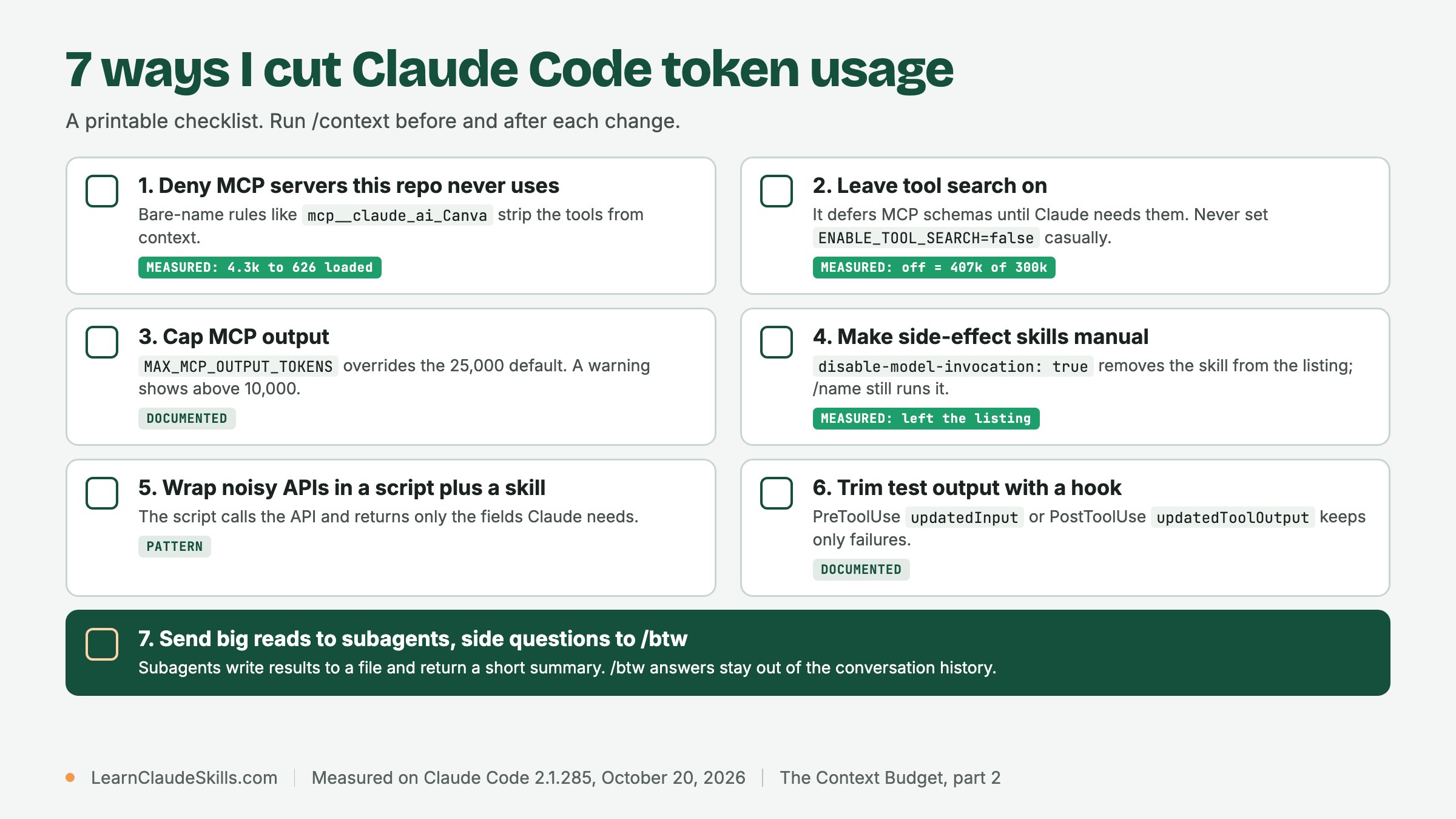
This is part 2 of The Context Budget. Part 1 explains each /context category; this part is the fix list. I mark every lever as measured (I ran /context before and after, on Claude Code 2.1.285 on October 20, 2026) or documented (the official docs describe it, and I did not put a number on it). Three of the seven are measured.
Where the tokens actually go
Claude Code sends your full conversation with every request, and each time Claude uses a tool it sends another request carrying the results, according to the costs documentation. Prompt caching softens this: repeated content is re-read at the cache rate, which is 0.1x of base input by default, 0.05x on Opus 5.5 and Sonnet 5.5, and 0.025x on Fable 5.1 (pricing). But your first message after a break longer than the cache lifetime reprocesses everything: the lifetime is an hour on a subscription and five minutes by default on an API key. Startup overhead rides along on every one of those requests, so it is worth shrinking.
1. Deny MCP servers you do not use (measured)
/context listed 395 MCP tools across my 10 servers. Four connectors I never touch while coding brought 291 of them: Adobe (109), QuickBooks (92), Todoist (47) and Canva (43). I denied three of them in a project .claude/settings.json, using bare server names with no wildcard.
{
  "permissions": {
    "deny": [
      "mcp__claude_ai_Intuit_QuickBooks",
      "mcp__claude_ai_Adobe_for_creativity",
      "mcp__claude_ai_Canva"
    ]
  }
}
A bare server name matches every tool from that server, and a bare-name deny removes the matching tools from Claude's context entirely. A scoped rule such as Bash(rm *) is different: the tool stays visible and only matching calls are blocked. The permissions documentation covers both forms, and deny rules from any settings scope are evaluated before allow rules.
Two details surprised me. Startup fell by 3.6k, not by hundreds of thousands, because tool search was already keeping the schemas out; the big drop was in the deferred pool. And the MCP server instructions row did not move, so denying a server's tools did not remove its instructions in my runs. To take a server out of the session entirely, disable it in /mcp. Under default tool search a deny rule does not break the prompt cache; with tools loaded upfront, removing a definition does (prompt caching). A deny rule for a server that is not connected does nothing.
For allow and deny basics, see Claude Code permissions and security. To commit a deny list for a whole team, see Claude Code settings.json as a context budget on ClaudeSkillsGitHub.
2. Keep tool search on (measured)
Tool search is the default on supported models: Claude sees tool names, and most full schemas load only when a task needs them. I set ENABLE_TOOL_SEARCH=false to see what it was saving me.
Never set it to false casually. The variable also accepts true, auto (load schemas upfront only when they fit within 10% of the window) and auto:N for a custom threshold; leaving it unset defers MCP tools by default (MCP documentation). Not quite all of them: on my machine six connector tools still loaded in full, which is the 4.3k MCP tools row in part 1. If one server is needed in every session, the alwaysLoad option on its entry in .mcp.json loads its tools upfront, so use it sparingly.
3. Cap large MCP results with MAX_MCP_OUTPUT_TOKENS (documented)
Tool search controls definitions. Tool results are a separate cost: once a big result lands in the conversation, it is re-sent with every later request. Claude Code warns when an MCP tool returns more than 10,000 tokens, the default ceiling is 25,000, and results over the limit are saved to a file instead (MCP documentation). To lower the ceiling, set the variable in the env block of your settings. 8000 is an example value, not a recommendation, and I have not measured its effect.
{
  "env": {
    "MAX_MCP_OUTPUT_TOKENS": "8000"
  }
}
4. Use disable-model-invocation for skills you run by hand (measured)
The Skills row in /context read exactly 10k in every run. That is the listing budget: 1% of the model's context window, so about 10k on a 1M model. My listing held 139 skills (84 personal, 22 synced from claude.ai, 17 from plugins, 16 built-in). Only 41 kept a full description, about 9,030 tokens together, the largest 480. The other 98 were listed by name only, under 20 tokens each.
That is the real cost of an overfull listing. The skills documentation says that when the listing overflows, Claude Code drops descriptions starting with the skills you invoke least. A skill listed name-only has lost the keywords Claude matches on, so it is less likely to trigger on its own.
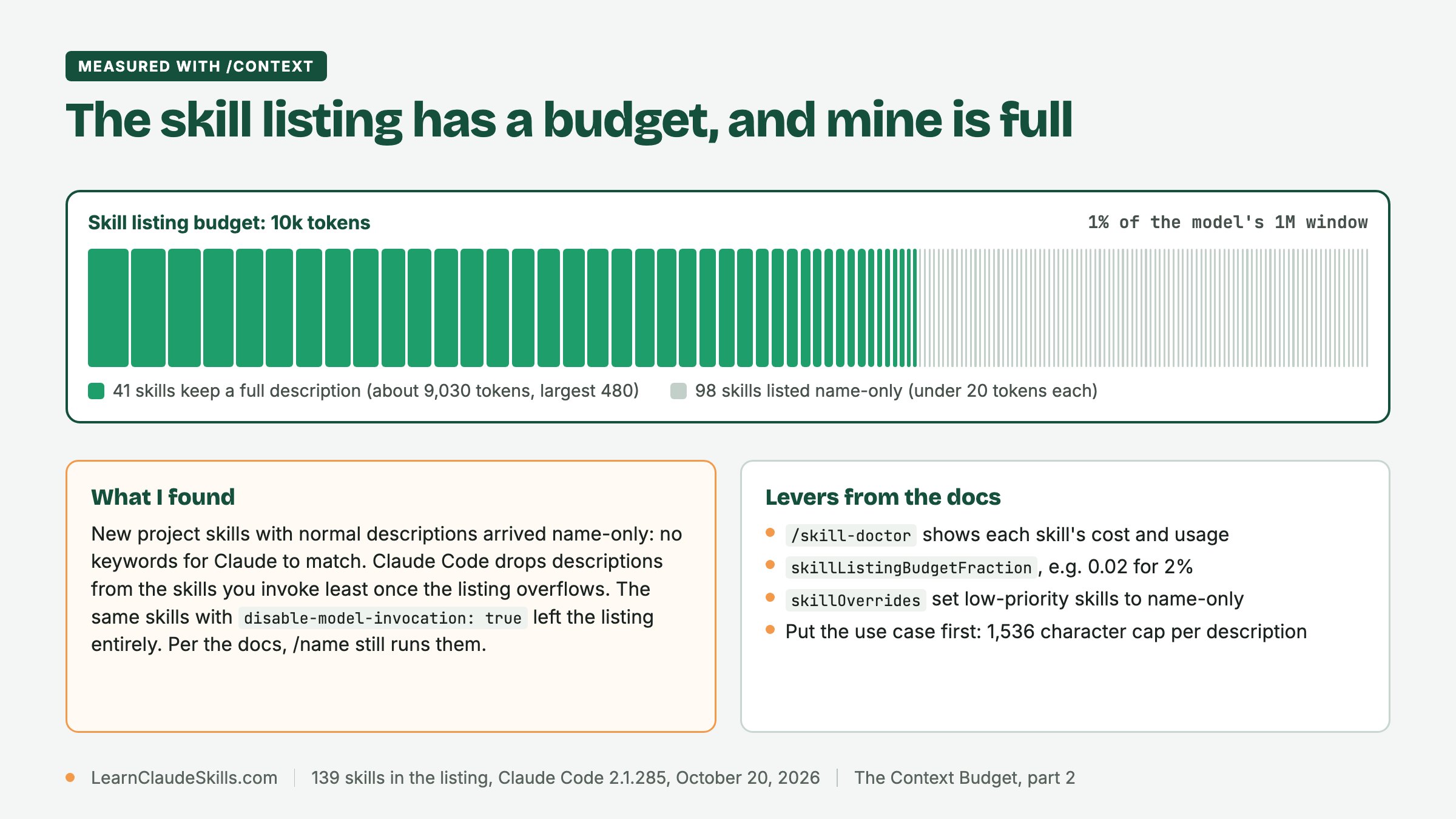
Then I added six project skills with ordinary descriptions. Every project skill that reached the listing arrived name-only. One of the six, seo-audit, shares its name with a personal skill: the listing showed a single seo-audit row, and that row lost the description it had before. With disable-model-invocation: true on the same six, no project skill appeared in the listing, the personal seo-audit got its description back, and the docs say /name still runs each one. The Skills row read 10k in both runs, because the listing is capped either way. (Both runs came after I added the 2.6k user-level rule that part 3 covers, so their totals sit above the 29.8k baseline.) Past the budget this lever does not save tokens; it saves descriptions for the skills Claude should pick on its own.
---
name: db-migrate
description: Generate and dry-run a database migration for a schema change, then print the SQL diff for review. Use when the user asks to add a column, change a table, or write a migration. Never applies a migration to production.
disable-model-invocation: true
---
# db-migrate

1. Run the bundled script with $ARGUMENTS.
2. Read only its summary output.- /doctor estimates the listing's context cost and its biggest contributors; /skill-doctor shows each skill's cost and how often you use it.
- The skillListingBudgetFraction setting raises the budget, for example 0.02 for 2%. The SLASH_COMMAND_TOOL_CHAR_BUDGET environment variable sets a fixed character count instead.
- skillOverrides can set low-priority skills to name-only, which frees budget for the rest.
- Each description plus when_to_use is capped at 1,536 characters in the listing (configurable with skillListingMaxDescChars), so put the key use case first.
{
  "skillListingBudgetFraction": 0.02,
  "skillOverrides": {
    "legacy-context": "name-only"
  }
}
Writing descriptions that survive a crowded listing is covered in The anatomy of a great description.
5. Wrap a noisy API in a script and a skill (pattern)
An MCP server or raw API call can return far more than you need, and the whole payload stays in the conversation. The pattern I use instead: a script calls the API and keeps only the fields that matter, and a skill tells Claude to run it and read only that output. Credentials stay in the script's environment, not in the prompt. The costs documentation makes the same point about CLI tools such as gh, aws and gcloud: they add no per-tool listing to context. I have no before and after number for this one; the saving depends entirely on the API.
---
name: open-issues
description: List open GitHub issues for this repository by number, title and labels. Use when the user asks what is open, what to work on next, or for a triage list.
---
# open-issues

1. Run:
   gh issue list --state open --limit 30 --json number,title,labels \
     --jq '.[] | "\(.number)\t\(.title)\t\([.labels[].name] | join(","))"'
2. Read only that output. Fetch an issue body only when the user names the issue.
Turning an existing script into a skill is a short job: see Add a helper script to a skill and Mastering CLI-Anything. For the architecture trade-offs, read the MCP vs CLI decision record on ClaudeSkillsGuide.
6. Trim test output with a hook (documented)
Hooks run outside the context window; only what a hook returns reaches Claude. Two documented fields can shrink test output. A PreToolUse hook can return updatedInput to rewrite a Bash command before it runs. A PostToolUse hook can return updatedToolOutput to replace what Claude sees after the tool ran; for Bash the replacement must keep the stdout, stderr, interrupted and isImage shape, or Claude Code ignores it (hooks reference). This example starts from the PreToolUse hook on the official costs page and changes one thing: it keeps the exit status of the test runner, which a plain grep and head pipeline loses. Register it in settings.json:
{
  "hooks": {
    "PreToolUse": [
      {
        "matcher": "Bash",
        "hooks": [
          {
            "type": "command",
            "command": "~/.claude/hooks/filter-test-output.sh"
          }
        ]
      }
    ]
  }
}
Save the script as ~/.claude/hooks/filter-test-output.sh and make it executable with chmod +x. It needs jq.
#!/bin/bash
input=$(cat)
cmd=$(echo "$input" | jq -r '.tool_input.command')

# For test runs, show failure lines and the summary, and keep the runner's exit status
if [[ "$cmd" =~ ^(npm test|pytest|go test) ]]; then
  filtered_cmd="(out=\$(mktemp); { $cmd; } > \"\$out\" 2>&1; rc=\$?; grep -A 5 -E '(FAIL|ERROR|error:)' \"\$out\" | head -100; tail -n 3 \"\$out\"; rm -f \"\$out\"; exit \$rc)"
  echo "$input" | jq --arg filtered "$filtered_cmd" \
    '{hookSpecificOutput: {hookEventName: "PreToolUse", permissionDecision: "allow", updatedInput: (.tool_input + {command: $filtered})}}'
else
  echo "{}"
fi7. Send big results to a subagent, and side questions to /btw (documented)
A subagent works in its own context window. Only its final response, plus a small metadata trailer, comes back to your session (context window documentation). My habit on top of that: I ask the subagent to write its full findings to a file and return a short summary with the file path, so the detail exists if I need it but never enters my main context. A narrow tool list and a smaller model keep the subagent's own requests cheaper; they still count toward your usage.
---
name: log-digest
description: Read large log or test output files and return only a short summary. Use when a log, trace or test report is too long to read in the main session.
tools: Read, Grep, Glob, Write
model: haiku
---
Read the files you are given. Write the full findings to a markdown file
next to the input, then reply with at most five bullet points and the
path of the file you wrote.
Save it as .claude/agents/log-digest.md. For a quick question that has nothing to do with the task, type /btw followed by the question: the answer appears in an overlay and does not enter the conversation (commands reference). More delegation shapes are in Subagent delegation patterns, and session habits such as clearing between tasks are in Better Claude Code sessions.
Measured or documented: the scorecard
- Measured with /context: lever 1 (deny unused servers, 29.8k to 26.2k), lever 2 (tool search off, 407k against a 300k window) and lever 4 (41 of 139 descriptions kept; new project skills listed name-only).
- Documented, not measured: lever 3 (MAX_MCP_OUTPUT_TOKENS), lever 6 (the test-output hook) and lever 7 (subagent summaries and /btw).
- A pattern from my own setup, not measured: lever 5 (script plus skill).
Once startup is lean, the next thing that grows is the conversation itself. Manage Claude Code tokens and context covers what to do as a session gets long, and part 1 has the full category breakdown. If CLAUDE.md is your biggest row, part 3 moves it into path-scoped rules.
Frequently asked questions
How do I stop Claude from using so many tokens?
Measure first with /context, then cut what you never use: deny or disable idle MCP servers, keep tool search on, set disable-model-invocation on skills you only run by hand, and clear between unrelated tasks. In my runs the deny rules alone took startup from 29.8k to 26.2k.
How many tokens is too many in Claude?
There is no fixed number. The hard edge is your compaction window: my tool-search-off run started at 407k against a 300k window, which is too many by definition. On price, the only long-context premium in the current table is Haiku 5.5, at 5x for requests over 100,000 prompt tokens.
Is Claude using more tokens lately?
I cannot answer that for your account, and I did not measure a trend. What I can say is that every connector and skill you add raises the floor. On a paid plan, the /usage breakdown attributes recent usage to skills, subagents, plugins and individual MCP servers, which is the quickest way to see what changed.
Why does Claude run out of tokens so quickly?
Long sessions re-send the whole conversation with every request, and a message after a break longer than the cache lifetime reprocesses all of it without the cache discount. Scheduled tasks, subagents and agent teammates add requests of their own. The costs documentation lists these causes.
Can you see your Claude Code token usage?
Yes. /usage shows the session's token usage and cache statistics, /context shows what is in the window by category, and a custom status line can show context usage at all times.
Does plan mode use more tokens?
The docs do not give a token figure for plan mode on its own, and I have not measured one. They recommend it for complex tasks because it prevents expensive re-work when the first direction is wrong.
Never miss a post
Updates on format changes, community features, and skill building.