Claude Code Context Window: What Fills It Before Your First Prompt (I Measured It)

The Claude Code context window is everything the model can see on a request: the system prompt, tool definitions, MCP server instructions, the skill listing, your CLAUDE.md and rules, and the conversation so far. On current models such as Opus 5.5 it holds 1 million tokens. When I ran /context in an empty folder on my Mac, 29.8k tokens were already in use before I typed a prompt. That is 10% of the 300k compaction window I set, and about 3% of the model's full window.
Almost none of that is my words. It is the machinery I installed: tools, connectors and skills. Below is the exact breakdown, what each line means, how to check your own, and what happens when the window fills.
How I measured it
I ran every test on October 20, 2026, with Claude Code 2.1.285 on macOS and the claude-opus-5-5 model. My machine has 10 MCP servers connected (claude.ai connectors plus chrome-devtools) and 139 skills in the listing, 84 of them personal. I made a throwaway empty folder, so no project CLAUDE.md or project settings could load, and captured /context headlessly.
I ran each scenario three times. The numbers were identical on every run where all connectors had finished connecting.
What /context showed before my first prompt
What each /context category means
- System prompt (2.5k): Claude Code's core instructions for behavior, tool use and formatting. It always loads first, and you never see it.
- System tools (10.4k): definitions of the built-in tools Claude can call, such as Bash, Read and Edit. Another 20k of built-in tool definitions were listed as deferred, so they stayed out of the window until needed.
- MCP tools (4.3k): full definitions of the few MCP tools that loaded upfront even with tool search on, which is the default. On my machine that was six tools, three from Adobe and three from Claude Docs; the per-tool rows add up to the 4.3k. Every other MCP tool waits in the deferred pool, and Claude loads its schema on demand through MCP tool search.
- MCP server instructions (2.8k): guidance text that connected servers send about how to use them.
- MCP tools, deferred (353.7k): the full schemas for the other 389 of the 395 tools across my 10 servers. They are not in the window; add the 4.3k loaded upfront and you get the 358k I measured with tool search off. /context shows them as 117.9% of my 300k window, which looks alarming but only tells you how much tool search is holding back.
- Skills (10k): the listing of skill names and descriptions. It is capped at a budget of 1% of the model's window, and my listing sat exactly at that cap. Part 2 shows what the cap does to descriptions.
- Memory files: CLAUDE.md files, rules without paths: frontmatter, and auto memory. An AGENTS.md can load in place of CLAUDE.md; AGENTS.md vs CLAUDE.md on ClaudeSkillsGitHub covers when. My empty-folder runs showed no such row. In part 3 the same row reads 11.2k with a real 332-line CLAUDE.md.
- Messages (10): the conversation so far, which in a fresh headless run is almost nothing.
- Autocompact buffer (33k): headroom that /context reports as reserved for automatic compaction. It is not content, and it is not part of the 29.8k.
- Free space (237.2k): what is left before the compaction point. Used tokens, the buffer and free space add up to the 300k window.
Two more runs: fewer connectors, and tool search off
Same machine, same empty folder, one change at a time.
- Denying three connectors I never use while coding (QuickBooks, Adobe and Canva) in a project .claude/settings.json: 26.2k / 300k (9%). The MCP tools row fell from 4.3k to 626 tokens, and the deferred pool from 353.7k to 79.8k.
- Setting ENABLE_TOOL_SEARCH=false: 407k / 300k (136%). Every MCP schema loaded upfront (358k), built-in tools rose to about 34k, and /context reported the session as 107k tokens past the compaction window before I had typed anything.
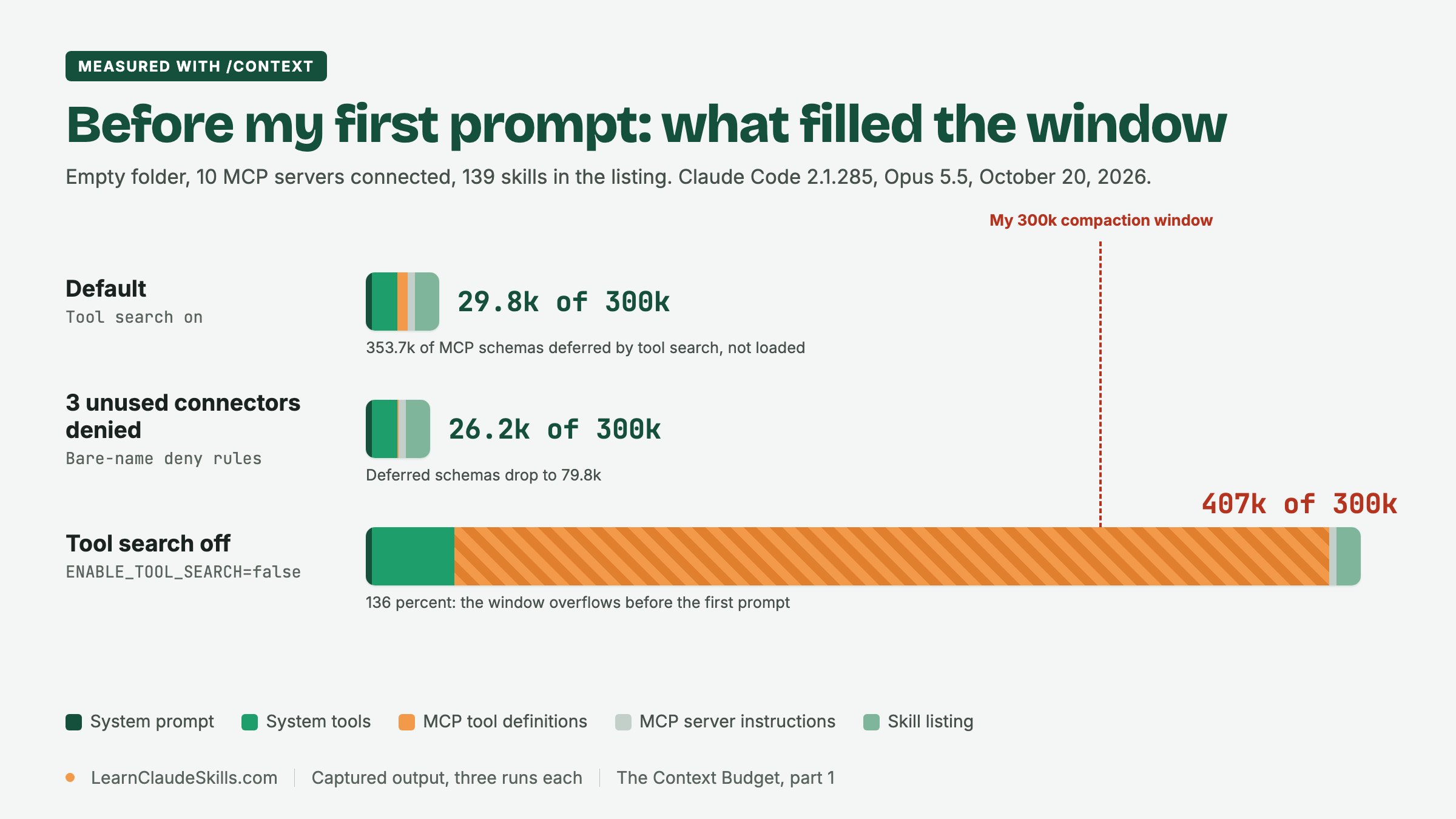
With tool search off, even a 1M window would start about 41% full on my setup. The fixes, with the exact deny rules, are in part 2. If you are still deciding between MCP servers and plain CLI tools, the MCP vs CLI decision record on ClaudeSkillsGuide lays out the trade-offs for a team.
What happens when the context window fills up
Claude Code compacts automatically as you approach the limit, so a full window does not end your session. Compaction replaces the conversation with a structured summary. According to the context window documentation, the system prompt, project-root CLAUDE.md, unscoped rules, auto memory and skill descriptions reload afterwards, up to five recently modified files are re-read, and path-scoped rules return when Claude touches a matching file again. The conversation itself does not come back verbatim: full tool outputs and intermediate reasoning are gone.
Where it happens depends on the model and your settings. Models with a native 1M window, including Opus 4.7 and later, compact at about 967K tokens by default. Opus 4.6 and Sonnet 4.6 without extended context compact at the 200K boundary. An auto-compact window you set moves the point earlier. For running it by hand, focusing the summary and choosing between clearing and summarizing, use our guide to managing Claude Code tokens and context.
How to check context usage in Claude Code
- /context: a live breakdown by category, including the MCP tools, memory files and skills that loaded. It is the only one of these that shows where the tokens come from.
- /usage: the Session block shows token usage and, from Claude Code 2.1.251, a prompt cache line. On a Pro, Max, Team or Enterprise plan it also attributes recent usage to skills, subagents, plugins and individual MCP servers. See the costs documentation.
- The status line: a custom status line can show context usage at all times. Its used_percentage field measures against the model's full window, so it does not tell you when an earlier auto-compact window will trigger.
- /memory: lists the CLAUDE.md and memory files in play and opens them for editing.
- /mcp: shows which servers are connected and lets you disable one. It reports connection status, not token cost, so pair it with /context.
- /doctor: includes an estimate of the skill listing's context cost and its biggest contributors.
New to slash commands? Start with Claude Code slash commands for beginners.
The 1M window vs my 300k autoCompactWindow
Opus 5.5, Sonnet 5.5 and Fable 5.1 run with a 1M-token window at standard pricing; there is no price step at 200K on these models. The only long-context premium in the current pricing table is on Haiku 5.5, where a request over 100,000 prompt tokens is billed at 5x. So a smaller window is not a pricing decision.
I still compact early. My user settings file (~/.claude/settings.json) sets autoCompactWindow to 300000, which is why every /context number in this series reads against 300k. That is my own context hygiene, not a documented recommendation: I would rather Claude summarize a long session at 300k than carry the whole history toward 1M on every request.
{
  "autoCompactWindow": 300000
}
The setting accepts 100K to 1M, and Claude Code caps it at the model's window. You can also set it for the current model with /autocompact 300k, for one launch with the --autocompact flag, or with the CLAUDE_CODE_AUTO_COMPACT_WINDOW environment variable, where a plain number means tokens. CLAUDE_AUTOCOMPACT_PCT_OVERRIDE also exists, but it can only lower the threshold; the window setting is the documented lever. See model configuration. To commit a context budget for a whole repository, read Claude Code settings.json as a context budget on ClaudeSkillsGitHub.
Run the same lab on your machine
- Run claude -p "/context" in an empty folder. That is your floor: tools, connectors and skills, with no project files.
- Run it again from your project root. The difference is your CLAUDE.md, rules and project settings.
- Run each one twice, because connectors connect asynchronously.
- If MCP tools or Skills dominate, continue with part 2. If Memory files dominate, go to part 3 and check your file against Crafting the perfect CLAUDE.md.
- Decide which servers you actually need with Connect Claude Code to MCP servers, which covers scopes and the /mcp menu.
Frequently asked questions
What does a 200K context window mean in Claude Code?
It is the older window size. Opus 4.6 and Sonnet 4.6 without their 1M variant, and any session started with CLAUDE_CODE_DISABLE_1M_CONTEXT=1, compact at the 200K boundary. Current models such as Opus 5.5 run with 1M by default, and you can still choose a smaller auto-compact window yourself.
What happens when I hit my context window in Claude Code?
Claude Code summarizes the conversation automatically before the window runs out, then keeps going. Startup content such as CLAUDE.md and the skill listing reloads; the detailed history becomes a summary. If startup content alone is bigger than the window, as in my tool-search-off run at 407k against 300k, /context flags the session as over the limit before you begin.
Does Claude Code have a 1 million token context window?
Yes, on current models. Fable models, Sonnet 5 and later, Haiku 5.5, and Opus 4.7 and later run with a 1M window by default, with no suffix needed. Opus 4.6 and Sonnet 4.6 reach 1M only through their 1M variant, and access to it depends on your plan.
How do I make Claude Code show the context window?
Run /context for a full breakdown at any point. For a constant readout, configure a status line that shows context usage, and remember that its percentage is measured against the model's full window.
What should I do when the context window is full?
Usually nothing: the automatic pass handles it. To slow the fill, clear between unrelated tasks, send large reads to a subagent, and cut startup overhead with the levers in part 2. The hands-on options for a long session are in Manage Claude Code tokens and context.
Never miss a post
Updates on format changes, community features, and skill building.