Claude Code Rules: I Split a 332-Line CLAUDE.md into Path-Scoped .claude/rules

Claude Code rules are markdown files in your project's .claude/rules/ directory, or in ~/.claude/rules/ for every project on your machine. A rule without paths: frontmatter loads at launch, like CLAUDE.md. A rule with paths: frontmatter loads only when Claude reads or edits a file that matches its patterns. I split a real 332-line monorepo CLAUDE.md into a 29-line router and four path-scoped rules. The CLAUDE.md that loads at startup went from 8.5k tokens to 613, and the session total from 40.9k to 33.1k.
Below is the split step by step: how I sorted the sections, the exact frontmatter, what stayed in the router, the before and after numbers, and the always-on pitfall that caught one of my own files.
What Claude Code rules are, and where to put them
- Project rules: any .md file under .claude/rules/. Files are discovered recursively, so subfolders such as frontend/ or backend/ work. Commit them, and everyone on the repository gets the same rules.
- User rules: files in ~/.claude/rules/ apply to every project on your machine. They load before project rules, and neither set overrides the other, so keep the two consistent.
- Frontmatter: paths is the only field Claude Code reads. It takes a YAML list or a comma-separated string of glob patterns, and the frontmatter is stripped before the rule enters context.
- No paths: the rule loads at launch with the same priority as .claude/CLAUDE.md, in every session.
Rules sit between CLAUDE.md and skills. CLAUDE.md holds facts Claude needs in every session; a rule holds instructions tied to one part of the codebase; a skill holds a procedure Claude runs when a task calls for it. For what belongs in CLAUDE.md itself, see Crafting the perfect CLAUDE.md. For the full map of mechanisms, see CLAUDE.md vs skills vs subagents vs hooks. The rules behaviour in this post comes from the memory documentation.
The starting point: a 332-line CLAUDE.md
My test subject was a real monorepo CLAUDE.md: 332 lines covering deploy routing, HTTPS settings for new domains, API-token capabilities and publishing hygiene. Every line loaded in every session, whether I was deploying or fixing a typo. I copied it into a throwaway folder and captured /context with Claude Code 2.1.285 on October 20, 2026.
The 2.6k user rule is a side finding I come back to below. The 8.5k is the target.
Step 1: sort every section by when Claude needs it
Go through CLAUDE.md one heading at a time and ask: does Claude need this in every session, or only when it touches certain files? My answers:
- Deploy routing and preflight checks (168 lines): only when editing deploy scripts, Wrangler config or the deploy preflight tooling.
- HTTPS hygiene for new domains (72 lines): only in the zone tooling.
- API-token capability notes (68 lines): only in the zone and email tooling.
- Public-surface hygiene, meaning no local paths in published copy (25 lines): only when editing site source or public assets.
- Everything else stays in CLAUDE.md: a short project summary, an index of where the rules live, a post-publish checklist that applies to every task, and a pointer to shared docs.
Step 2: write each rule with paths: frontmatter
.claude/rules/
  deploy.md              168 lines
  zone-https.md           72 lines
  cloudflare-tokens.md    68 lines
  public-surface.md       25 lines
Each file starts with frontmatter naming the files it governs, then the section moved over from CLAUDE.md. This is the top of deploy.md, the largest:
---
paths:
  - "sites/**/deploy.ps1"
  - "sites/**/wrangler.jsonc"
  - "sites/**/scripts/deploy/**"
  - "tools/deploy-preflight/**"
---
## Account map and deploy routing

(the rest of the deploy section, moved over from CLAUDE.md unchanged)
The frontmatter of the other three files:
zone-https.md
---
paths:
  - "tools/cf-zone/**"
---

cloudflare-tokens.md
---
paths:
  - "tools/cf-zone/**"
  - "tools/cf-email/**"
---

public-surface.md
---
paths:
  - "sites/**/src/**"
  - "sites/**/public/**"
---
Glob notes from the docs: ** matches any depth, a brace group such as src/**/*.{ts,tsx} covers several extensions, and a pattern with a stray [ matches nothing. If the YAML between the markers does not parse, Claude Code ignores the frontmatter and loads the rule as if it had no paths, so run claude --debug if a rule seems to load too often.
Step 3: cut CLAUDE.md down to a router
What remained became a 29-line router. Its job is to say what the project is and where the detail lives. I name the rule files in plain text and do not import them: an @ import loads the imported file at launch, which would put the tokens straight back.
# Project instructions

Monorepo of statically built sites. Each site lives under sites/<domain>/
and deploys on its own.

## Where the rules live

Topic rules load only when you open a matching file:

- Deploys, account routing and preflight checks: .claude/rules/deploy.md
- Zone HTTPS hygiene: .claude/rules/zone-https.md
- API token capabilities: .claude/rules/cloudflare-tokens.md
- Public surface hygiene (no local paths in published copy): .claude/rules/public-surface.md

## After a publish

(a short checklist that applies to every task)
The index helps people and Claude alike: when a task is obviously about deploys, Claude can open the rule file directly instead of waiting for a matching file read. The memory documentation targets under 200 lines per CLAUDE.md, so 29 leaves plenty of room for what genuinely applies everywhere.
Step 4: measure before and after
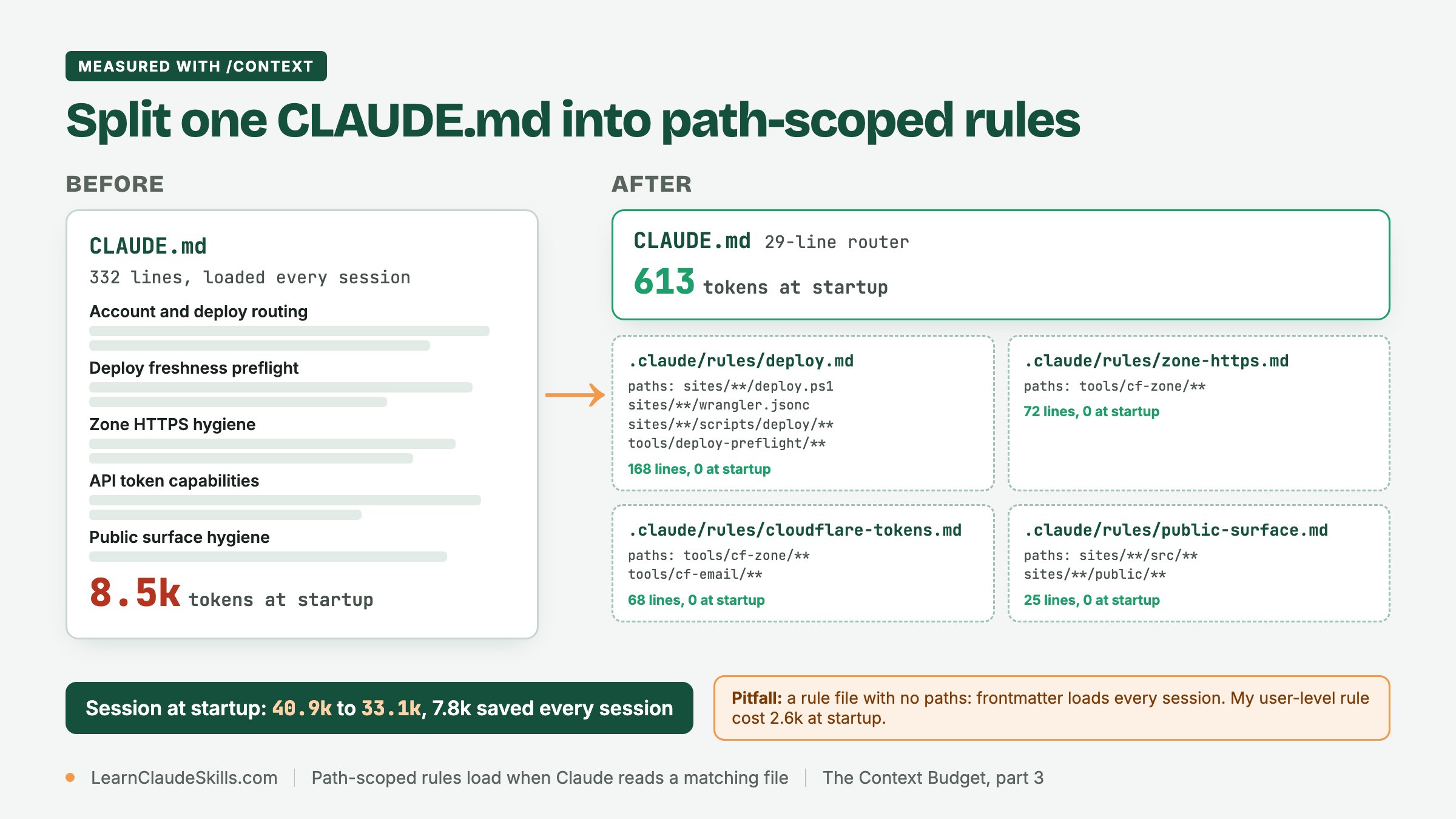
That is 7.8k tokens off every session start, and every request in the session carries the difference. (The Memory files row alone fell by 7.9k; the session total moved 0.1k less because one connector was still connecting during the before run, so its MCP tools line read 4.2k instead of 4.3k.) The rule files still exist; they just wait. According to the docs, a path-scoped rule loads when Claude uses Read, Write or Edit on a matching file, or views one with a Bash command that counts as a read, such as cat or head on a single file. In the terminal you see a one-line Loaded notice, not the rule's content.
A checklist for your own split
- Start a fresh session, run /context, and write down the Memory files row and the size of each CLAUDE.md it lists.
- Tag every CLAUDE.md section as every-session or file-specific. Be strict: "useful to know" is not the same as "needed every time".
- Move each file-specific section into .claude/rules/<topic>.md, with paths: globs that match the files it governs and nothing broader.
- Replace the moved text in CLAUDE.md with a one-line pointer to the rule file, written as plain text rather than an @ import.
- Start another fresh session and run /context again. The path-scoped rules should be absent from Memory files.
- Ask Claude to open a file that matches one rule, and check that the one-line Loaded notice appears.
The always-on pitfall: a rule without paths:
The side finding: one rule file in my own ~/.claude/rules/ had no paths: frontmatter, and it loaded 2.6k tokens at startup in every run, before and after the split. Nothing was wrong with it except that it applied everywhere. A rule without paths: is always on, exactly like CLAUDE.md, and a user-level one is on in every project. Before you create a rule, decide which files it is about. If the honest answer is all of them, keep it, but count it.
- Broken YAML: if the frontmatter does not parse, the rule loads as if it had no paths.
- Long sessions: path-scoped rules load into the message history, so when a long session is summarized they drop out and return only when Claude touches a matching file again. If a rule must survive that, remove paths: or move it into the root CLAUDE.md (context window documentation).
- Symlinks: rules linked from outside the project load only after you approve external imports, and then only the ones without paths.
A rule is still context, not enforcement. If something must never happen, such as an edit to a production config, use a permission deny rule or a PreToolUse hook. Hooks vs skills explains when instructions are not enough, and Claude Code settings.json as a context budget on ClaudeSkillsGitHub shows how a team commits deny rules alongside its rules folder.
If Memory files was not your biggest row, go back to part 1 to find out what is, and to part 2 for the MCP and skill levers.
Frequently asked questions
How do I add rules to Claude Code?
Create a .claude/rules/ folder in your project, add one markdown file per topic, and give each file paths: frontmatter listing the globs it applies to. Start a new session and run /context: a path-scoped rule should not appear under Memory files until Claude reads a matching file.
Where do I put Claude rules?
Project rules go in .claude/rules/ at the repository root, committed with the code. Personal rules that should apply to every project go in ~/.claude/rules/.
What are Claude rules, and how are they different from CLAUDE.md?
Both are instructions Claude reads as context. CLAUDE.md always loads at launch. A rule loads at launch only when it has no paths: frontmatter; otherwise it waits for a matching file. Use CLAUDE.md for what every session needs and rules for what one part of the codebase needs.
Do global rules load at startup and path-scoped rules on demand?
Yes. Rules without paths:, in ~/.claude/rules/ or in the project, load at launch; my user-level rule cost 2.6k in every session. Rules with paths: load when Claude reads or edits a matching file; my four path-scoped rules added nothing at startup.
Do .claude/rules files work with AGENTS.md?
Yes. Claude Code reads AGENTS.md natively from v2.1.277, when there is no CLAUDE.md in the working directory or above, and .claude/rules/ files keep loading alongside it. For choosing between the two files, see AGENTS.md vs CLAUDE.md on ClaudeSkillsGitHub.
Never miss a post
Updates on format changes, community features, and skill building.