Better Claude Code Sessions: A Practical Guide to Prompts, Skills, and Recovery
A useful Claude session has a specific destination, the right source material, and a way to tell whether the result is ready. If you spend more time correcting the assistant than using its work, improve those three things before adding a longer prompt or a larger model.
This guide is for people authoring skills, writing content, or building small tools with Claude Code. The brief and review habits also work in Claude chat. Commands such as /clear, /compact, /rewind, and /btw belong to Claude Code; availability in other interfaces varies. Product details were checked against official documentation on October 13, 2026.
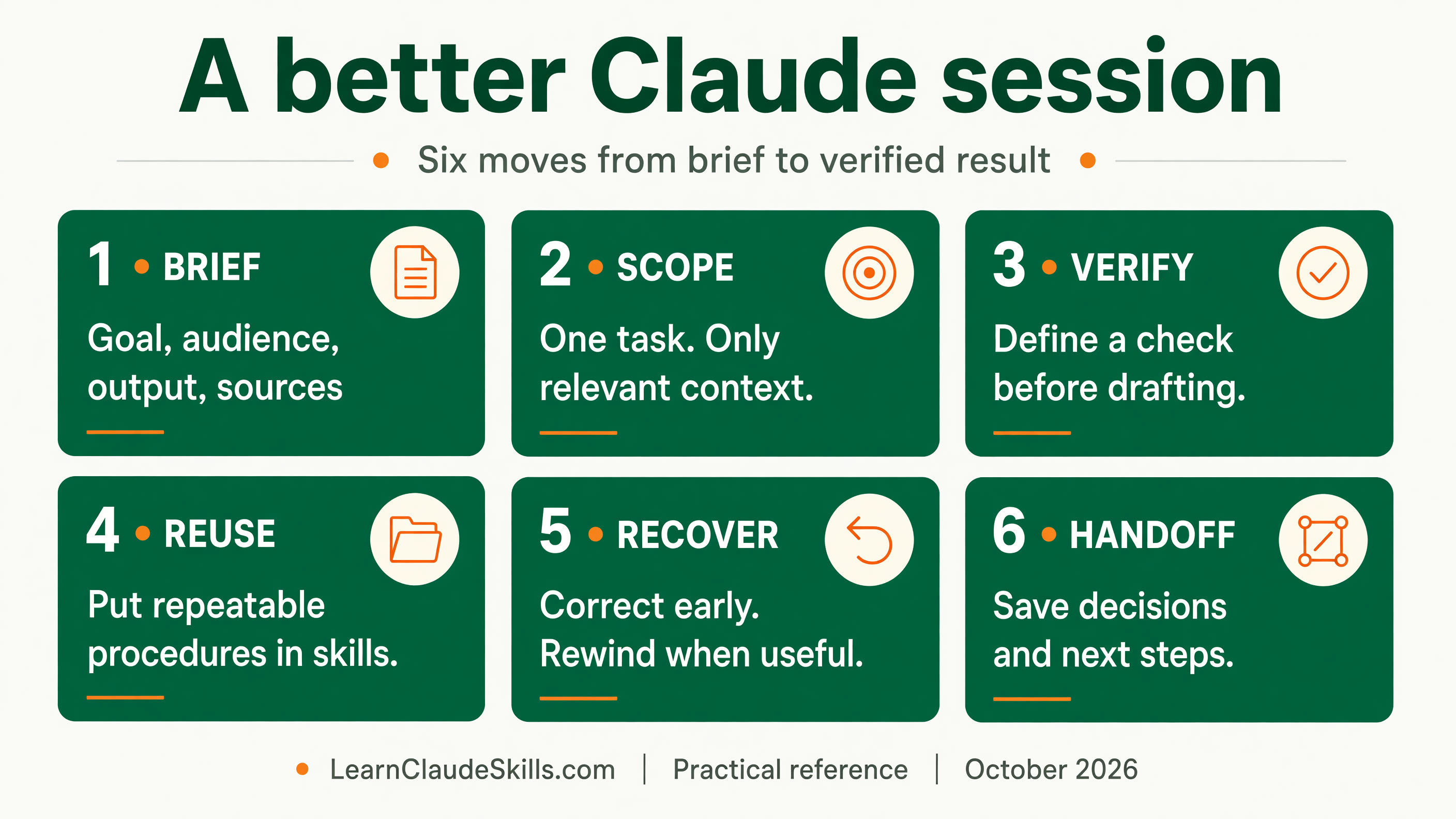
Open the full-size session checklist JPEG to save or print it.

1. Write a brief the result can be checked against
Instead of asking for an article and discovering the audience five prompts later, define the decision the reader needs to make. Supply the material that supports it. State the output format and the few boundaries that matter. A useful brief is short enough to scan and specific enough to grade.
Goal: Help a first-time skill author write a narrow trigger.
Audience: People familiar with Claude chat, new to Claude Code.
Output: A 600-word guide, one SKILL.md example, four trigger tests.
Sources: Official skills documentation and the supplied examples.
Constraints: Explain new terms. Separate product facts from advice.
Acceptance: The example has valid frontmatter, and the tests include
requests that should trigger the skill and requests that should not.
If an important fact is missing, identify it before making it up.
Explain the reason for an unusual rule. For example: use short paragraphs because readers will follow the guide beside a terminal. A reason helps the assistant apply a constraint when the situation changes. For work involving multiple formats, include the shared facts and format requirements in the same brief, then review each output separately.
A bigger project may need questions before drafting. Ask Claude to identify decisions that change the implementation: who can access the feature, where data comes from, and what a successful user action looks like. Resolve those decisions in a short spec. A small, clear edit can proceed directly.
2. Keep one task in focus and preserve a useful handoff
A task can span several phases. Research, drafting, and checking one guide can share a session. Writing an unrelated email during that session adds material the guide does not need. Start a separate session for the email, or finish the guide and save its state before switching.
Claude Code offers /btw for a side question that should stay outside the main conversation history. Use /clear for a new task and /compact when you need to shorten the history while continuing the same task. These commands serve different purposes; clearing context is not a guarantee that the next request costs nothing. See the interactive-mode documentation and our cache and routing guide.
Before a break or a new session, save a handoff containing the goal, accepted decisions, current files, evidence already checked, open questions, and next step. Write it where the next session can read it. A summary is useful working state; the source documents and current files remain the evidence.
3. Keep persistent instructions small and put procedures in skills
CLAUDE.md is a good home for facts that matter across your project: unusual build commands, conventions, and recurring constraints. A complete tutorial for one occasional job belongs in a skill. Anthropic recommends targeting under 200 lines per CLAUDE.md file; that is guidance for clarity, not a magic limit that guarantees compliance. Imported instruction files still consume context. See project memory and rules.
A skill packages a repeatable procedure. Its description helps Claude decide when it is relevant, while the body explains what to do. Put long examples and exceptional cases in referenced files and read them only when needed. This progressive disclosure pattern makes the main procedure easier to maintain. Keep secrets out of the skill.
Here is an original, deliberately narrow example. Save it as SKILL.md inside a release-note-draft skill folder in your project skill directory. It drafts from supplied material; it does not need a repository integration to work.
---
name: release-note-draft
description: Draft customer release notes from supplied merged-change notes. Use when the user asks for a product update or release-note draft.
---

# Release-note draft

Input: merged-change notes and the intended customer audience.
Output: a reviewable draft with Changes and Action needed sections.

1. List the supplied changes and their source identifiers.
2. Identify who each change affects. Flag missing availability facts.
3. Draft plain-language notes using only supported claims.
4. Check each factual sentence against its source note.
5. Return the draft and unresolved questions for the owner.

For unusual cases, read references/examples.md when that file exists
and the case is relevant. Publication is a separate task.
Test the description with both matching and nonmatching requests. Try: draft release notes from these merged changes; summarize this product update for customers; explain this stack trace; and write an unrelated sales email. Decide the expected behavior before running the tests. A useful skill should activate for the first two and leave the other tasks alone.
The skills reference explains installation and invocation controls. For a Claude-specific workflow with side effects, disable-model-invocation can make invocation manual. That field is an invocation control, not permission to publish, delete, or spend. Our skill-authoring path develops the trigger and evaluation process further.
4. Show the target style and give feedback that can be applied
For writing, supply a short approved example and identify what makes it work: concrete opening, plain vocabulary, or a visible next action. For an interface, provide the actual design tokens or a reference image and specify which properties to follow. Naming the audience and layout helps more than a general request to make the output look less like AI.
Anthropic documents that vague instructions to avoid generic frontend design can simply change the default style. Concrete pattern guidance works better. Its Opus 5.5 prompting guide also suggests testing removal of generic think-carefully instructions in chat integrations. Keep the real task constraints; replace prompting rituals with acceptance criteria.
Feedback should name the defect and the desired change: the opening assumes prior knowledge; define skill before the example. Or: patch the availability claim using the rollout note, then inspect other availability claims. A targeted correction preserves good work and makes the next review easier.
5. Choose alternatives where uncertainty makes them valuable
Generate two or three alternatives for a short, uncertain decision such as an opening, title, or navigation label. Define the selection criteria first: accuracy, clarity for a beginner, and fit with the stated goal. Comparing small alternatives can help you discover the right direction without regenerating a complete project.
Several drafts from one model are variants, not independent evidence. The model can help compare them, but its preference does not prove a factual claim or validate a working feature. Check source-dependent statements against the source, and let a human or fresh reviewer assess important decisions. Stop making variants once the uncertainty is resolved.
6. Give Claude a check and recover before errors accumulate
For a content task, verification might mean every cited URL opens, every date agrees with its source, and every example matches the current interface. For code, name the test or user action that proves the original failure is fixed. Ask for the evidence, including what remains unverified. Anthropic emphasizes executable checks in its Claude Code best practices.
If a correction still misses the same requirement, inspect the brief and evidence before repeating it. Rewind to a useful checkpoint or start from a concise handoff when the session has accumulated conflicting attempts. Treat two failed corrections as a practical signal to reconsider the approach, not a mandatory countdown.
Claude Code /rewind can restore conversation state, supported file changes, or both. It does not reverse every effect of a shell command, database update, email, or external tool. Git and suitable backups still matter for work you need to recover. Check the checkpointing limitations before relying on a rewind.
7. Bound research and inspect extensions before relying on them
Tell Claude which sources to inspect and what answer you need from them. For example: read the two supplied product notes and identify changes affecting existing customers, returning source identifiers with each finding. If the evidence is missing, widen the search deliberately. A large pile of irrelevant documents makes review harder.
A subagent can investigate in a separate context and return a concise summary with evidence pointers. Use one when the research volume or specialist focus justifies the extra run, then verify consequential findings at the source. Ask for a bounded output, not a second full transcript. The subagent documentation describes the available controls.
Before adding a skill or plugin, inspect its instructions, bundled scripts, hooks, tools, source, and requested access. Plugin contents differ, and skill bodies are loaded on demand; ten installed plugins do not imply ten full procedures are inserted into every request. Inspect what your setup actually loads. Start with our five-minute skill audit.
8. Use a small review loop for the next real task
- Write the goal, audience, source material, and output in one brief.
- Choose one meaningful check before the work starts.
- Review a short outline or small draft when the direction is uncertain.
- Patch named defects and recheck the affected claims or behavior.
- Capture a reusable skill only after the procedure proves useful.
- Save a handoff with decisions, evidence, and next action before switching tasks.
This is the first stage of the Practical Skill Authoring knowledge path: establish a focused session, package a procedure, test its trigger, then review its output. Continue with reliable skill triggers and packaging and sharing. Repository maintainers can use the companion verified pull request workflow, while teams choosing models can use the routing and caching guide.
Never miss a post
Updates on format changes, community features, and skill building.