Verify a GitHub Repo Before You Run It
Audit a repository before you clone, install, or execute it, and know what to do if you already ran it.
~12 min read
Use this page when you are about to clone, install, or double-click anything you did not write. That includes a skill pack, an MCP server, and a one-command installer pasted from a README or a chat thread.
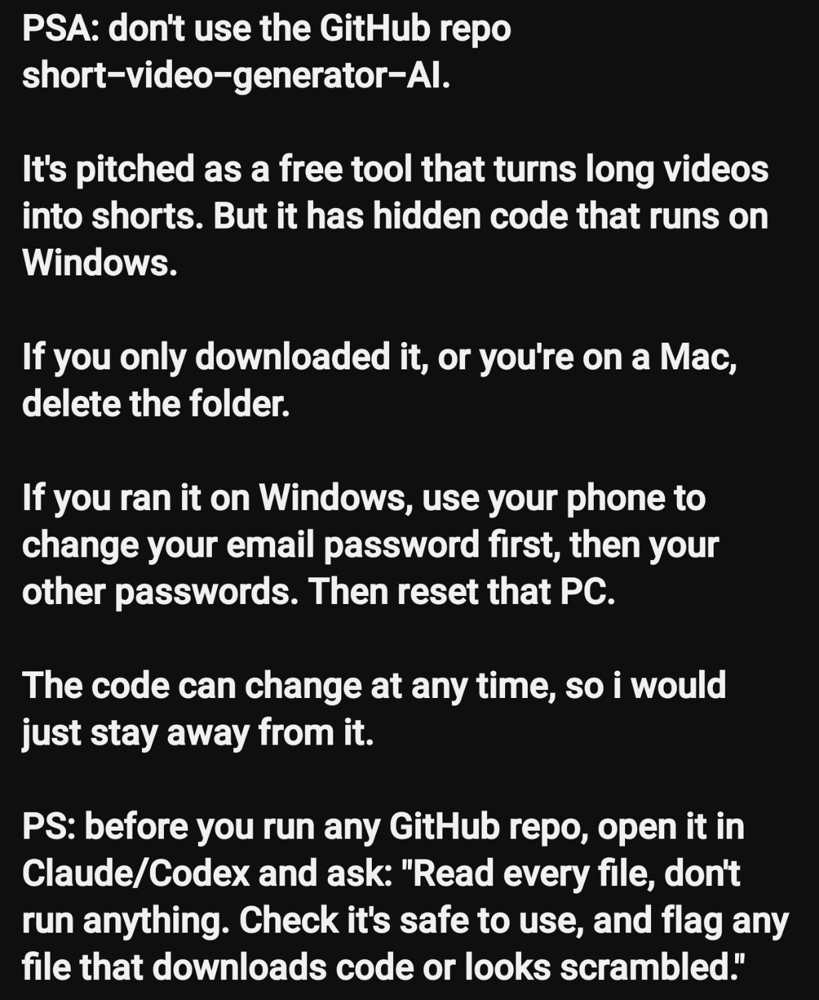
The screenshot is a warning about a free tool pitched as turning long videos into shorts, with hidden code that runs on Windows. Treat that as a case study, not a one-off, and do not go clone the named repo to "check." The same wrapper has been used for fake AI video products, counterfeit Claude and ChatGPT installers, and lookalike skill repositories.
Three different actions get called using the repo
- Viewing the GitHub page trusts almost nothing, and you can close the tab.
- Cloning trusts the files on disk. Delete the folder and you are done, if you never ran a script.
- Installing dependencies trusts every package the lockfile names. Running main.py, install.bat, or an executable trusts your user account, and often the whole machine.
The 10-minute audit
Do this in order. Stop at the first hard no.
- Confirm you are on the owner and repo you intended. Check the spelling. Prefer a github.com URL you typed over a Download button on a marketing page. Look at account age, other repositories, issue threads, and whether stars arrived in a one-day spike.
- Pin the revision. Copy the commit SHA. Review that snapshot, not whatever the default branch is tonight. Write down owner, repo, SHA, date, and go or no-go. An updated skill is a new skill. An updated repo is a new repo.
- Read the tree before the README. The README is the pitch. The tree is the contract. Open scripts, bin, release, dist, workflows, and any install or update helper.
- Hand the checkout to a model that cannot run it. Paste the prompt below. If the tool can run shell commands, forbid install, run, and network in the first line.
- Open every file the model flags. A summary is not a review. If you cannot tell what a file does, the answer is no-go.
- Inspect what the package manager will fetch. Look at requirements files, package.json, and any postinstall script. An unpinned dependency can change under you.
- Decide. Go only if the tree matches the README, network calls are named and necessary, there is no second-stage download of executable code, and you know which commit you reviewed.
Read every file in this repository. Do not run anything. Do not install
dependencies. Do not follow README install steps.

Tell me:
1. What the project claims to do, in one paragraph.
2. Every file that executes, downloads, decodes, or writes outside the
   project folder.
3. Every network call, including package indexes, model downloads,
   telemetry, and raw URLs.
4. Any obfuscated, minified, or scrambled file, and what it appears to be.
5. Any Windows-only, macOS-only, or hidden helper the README does not mention.
6. Whether a later git pull or a release asset could change what I just read.
7. A go or no-go recommendation, with the exact files that drove it.

Flag uncertainty. Do not give me the benefit of the doubt.
Red flags
Any one of these is enough to delete the folder.
- A hidden or Windows-only payload the README does not describe.
- Obfuscated Python, PowerShell, or JavaScript with no reason to be opaque.
- Download-then-execute from a raw file host, a chat CDN, or a bare IP.
- Persistence: scheduled tasks, services, registry Run keys, or LaunchAgents.
- Credential harvest disguised as connecting your accounts.
- Release binaries that are not produced by a visible build.
- Instructions to turn off operating-system or antivirus protections.
- A lookalike name of a tool people already want, including Claude, ChatGPT, or a popular video editor.
If you already ran it
- Do not troubleshoot on the same machine.
- Use your phone or another clean device.
- Change the email password first. Turn on an app or hardware second factor.
- Change GitHub, Google, Microsoft, banking, and cloud passwords. Revoke sessions.
- Treat saved browser passwords and cookies as stolen.
- Rebuild the computer. Scanning and hoping is not a plan after an unknown payload.
If you only cloned it and never executed a script or binary, delete the folder and stop.
Skills and catalogs
Skills travel through GitHub. That is convenient and unsafe in the same way a package registry is convenient and unsafe. Before you install a community skill, read the SKILL.md end to end, run this guide on the repository that contains it, and refuse any skill whose folder includes a binary or downloader the skill file does not declare. Record the source URL and the revision. A static scan that found no risk patterns is a signal, not a verdict.
Copy-paste checklist
- I am on the owner and repo I intended.
- I recorded the commit SHA.
- I listed the tree, including scripts, workflows, and installers.
- A model read every file and was forbidden to run anything.
- I opened every flagged file myself.
- I checked dependency files and postinstall hooks.
- There is no unexplained download-and-run path.
- There is no obfuscated blob and no persistence helper.
- The decision is written down: go or no-go.
Get new guides in your inbox
One task, one guide, done fast. Practical Claude Code skills, zero noise.