Let Claude Code Ask Codex for a Second Opinion with Frontier Advisor
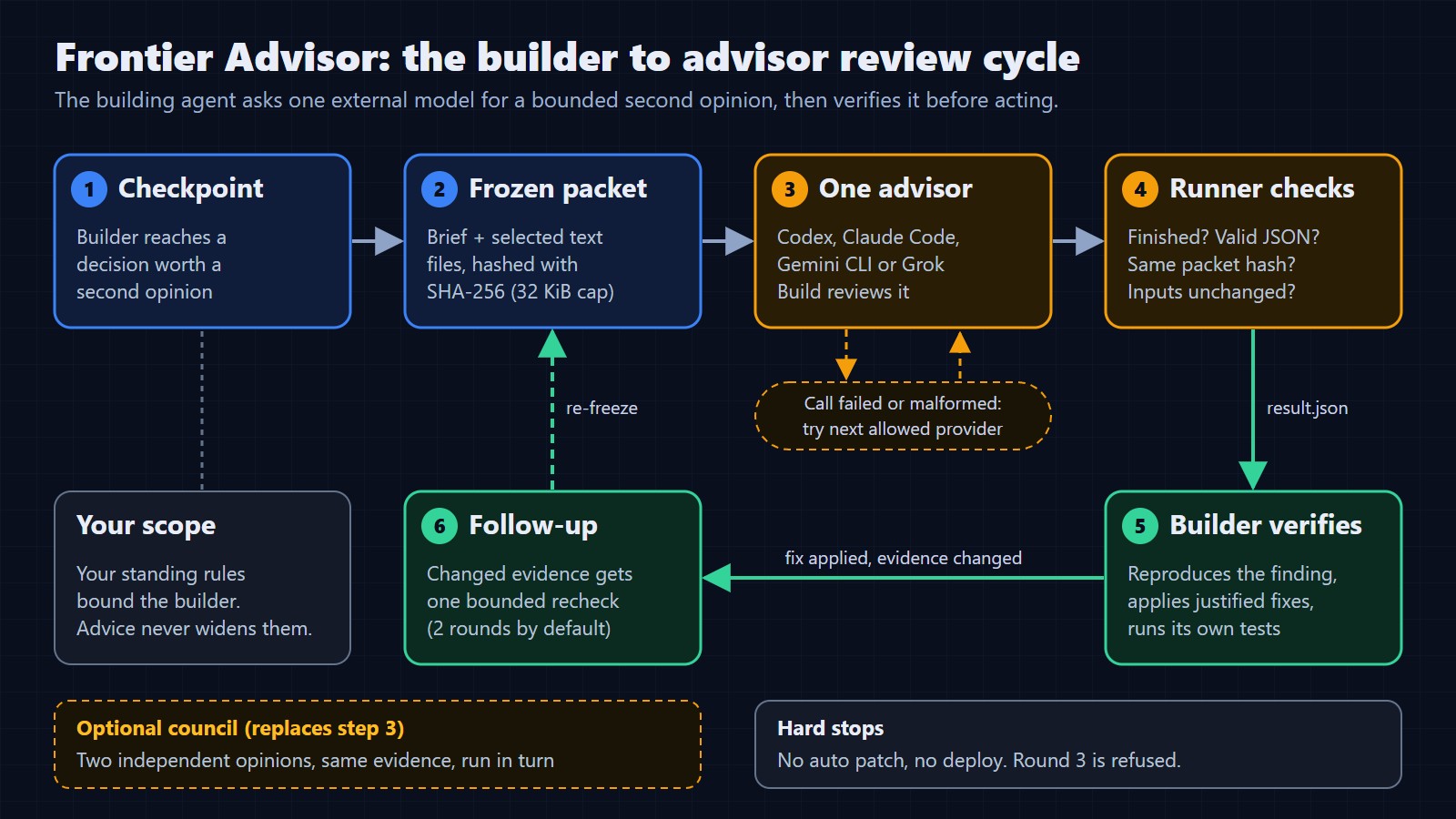
You are working in Claude Code and reach a decision you would like another model to check. You can copy the problem into a second tool, wait for an answer, and carry that answer back yourself. Frontier Advisor gives the building agent a repeatable way to make that handoff without you in the middle.
That matters most when you are not at the keyboard. Leave Claude Code with a long task and it eventually hits a question it should not answer alone: is this boundary right, which of these two designs is safer, does this skill misroute. Without a plan it either stops and waits for you, or it guesses. With Frontier Advisor it can hand that question to a different frontier model, such as Codex, check the answer against the actual code, and keep going inside the limits you already set.
I have relayed questions between agents by hand for months. This tool makes the handoff repeatable. It combines a portable skill, which tells the agent when and how to ask, with a small Python runner, which captures the evidence, makes the call, and checks what comes back. It ships adapters for Codex, Claude Code, Gemini CLI and a compatible Grok Build CLI. This guide uses Claude Code as the builder and Codex as the advisor.
What you are installing
There are three separate pieces. Keeping them straight saves most setup confusion.
- The skill: a SKILL.md file plus platform notes. It is instructions for the agent: when a second opinion is worth asking for, how to write the brief, how to treat the answer. It contains no code.
- The runner: a Python package with a frontier-advisor command. It freezes the evidence you select into a packet, launches the advisor CLI with restricted settings, enforces time and size limits, and validates the JSON that comes back. It has no third-party Python runtime dependencies.
- The provider CLI: Codex, Claude Code, Gemini CLI or Grok Build, installed and signed in with your own account. Frontier Advisor does not install it, sign you in, or bill you. Each call uses that account's normal allowance.
The diagram at the top of this page shows how they fit together. The builder reaches a checkpoint, the runner freezes a packet, one advisor reviews it, the runner checks the result, and the builder verifies any finding before it changes anything. A failed call can fall through to a backup provider. A changed file can get one bounded recheck.
Before you start
- Python 3.10 or newer. If your machine calls it python3 or py, use that name in every command below. On Windows, a Microsoft Store alias that opens the Store instead of Python does not count; install a real interpreter.
- Git, or a browser to download the source archive.
- The Codex CLI, installed and signed in. Run it once by itself and confirm it answers before you involve Frontier Advisor.
- A builder that can run local commands. Claude Code in a terminal or IDE works. A chat window with no shell does not.
Step 1: get the runner
Step 2: run the offline simulation
Before you spend anything, watch the orchestration work with fake providers. The demo makes the first provider fail on purpose and lets a second one return a canned finding, so you can see a fallback without credentials or model calls.
Step 3: check the CLI with doctor
The doctor command runs the provider's help output and confirms the flags Frontier Advisor depends on are present. It is fast and calls no model.
Take that note at face value. A passing doctor means your installed CLI understands the command Frontier Advisor will send. It does not prove you are signed in, that you have quota left, or that the model will be right. Those you find out on the first real call.
Step 4: look at the bug before the model does
The repository includes a deliberately small example so your first review has a known answer. The brief states the rule:
examples/brief.md

Review the supplied shipping-price function for correctness.

The store offers free shipping for orders of $50 or more. Otherwise shipping is $5.
Amounts are expressed in dollars. Focus on the threshold; do not redesign the pricing system.
No runtime tests have been supplied. Identify the boundary case and a focused verification.
examples/shipping.py
def shipping_cost(order_total):
"""Orders of $50 or more qualify for free shipping."""
return 0 if order_total > 50 else 5Notice the shape of the brief, because it is the pattern for every review you will run later. It states the expected behavior, says what to focus on, says what not to do, and admits what has not been tested. A good brief asks a narrow question. "Is this code good?" invites a redesign. "Is the threshold right?" gets you a verdict.
Step 5: run one real review
If you want to see exactly what will be sent first, add --dry-run. It builds and hashes the packet and stops before any model call. Our dry run reported 471 bytes of selected evidence and a 2,363 byte prompt. Then run it for real:
Three things in that output are worth reading closely. The finding cites evidence by location, so you can check it. The limitations field says plainly that nothing was executed, so the reviewer is reasoning about code, not reporting a test result. And the token count is far larger than the 471 bytes you sent, because the provider adds its own system context. More on that below.
Step 6: verify before you fix
A completed call does not mean the finding is true. The runner checks that the response has the right structure, refers to the right evidence packet, and has a verdict consistent with its findings. It cannot check whether the reasoning is correct. That is the builder's job, so do it before editing. Work in a disposable copy of the example, so the original stays buggy for your next demo.
The middle number is the whole story. Before the fix, an order of exactly $50 paid $5. After it, $50 ships free and the neighbors on either side still behave. That local check, not the model's confidence, is your evidence that the fix works.
Step 7: send the fix back for one follow-up
Now ask the same advisor to look at the changed file, linked to the first review. The first run printed a run_directory. Its result.json is what you pass to --follow-up. Replace PREVIOUS-RUN with the folder name from your own output.
The follow-up is rejected if the evidence has not changed, and a chain stops after two rounds by default, counting the first review. That stop is deliberate. An agent that keeps asking until something says yes is not getting a second opinion, it is shopping for approval. When the limit is reached, the right move is to report what is still unresolved, not to start a fresh chain to get around it.
How to read any result
- APPROVED (exit 0): a valid review found no actionable issue in what you supplied. It is advice about that scope, not a guarantee.
- DRY_RUN (exit 0): the packet was built and no advisor was called.
- CHANGES_REQUIRED (exit 2): at least one finding to investigate. Reproduce it before changing anything.
- INCOMPLETE (exit 3): a call failed, timed out, or evidence was missing. This is never approval.
- STALE (exit 3): a selected file changed while the review was running. Capture the current state and ask again.
- CONFIGURATION_ERROR (exit 4): bad arguments, unreadable input, or an exhausted round budget.
Hand the workflow to Claude Code
So far you have driven the runner yourself. The point is for Claude Code to do it. Copy the skills/frontier-advisor folder from the clone, including its references folder, into your personal skills folder at ~/.claude/skills/frontier-advisor, or into a project's .claude/skills folder. Start a new session so Claude Code picks it up. The runner still has to be installed: the skill tells Claude when to call frontier-advisor, and the command has to exist.
Then give the session its standing instruction. This is the directive from the release, adapted slightly. Paste it at the start of a session or put it in your project instructions:
Stepping away: let a second model stand in at decision points
Here is where the setup pays off. Long tasks stall at judgment calls. If you are in a meeting or asleep, Claude Code has three options at each one: stop and wait, decide alone, or ask someone. Frontier Advisor makes the third option real. Another frontier model, possibly one that is stronger than you at that particular question, reviews the decision, and Claude checks the answer against the code before acting on it.
Set it up in three parts before you leave.
- Make sure the review command will not stop on a permission prompt. If you are not there to approve it, the session waits. In Claude Code, the allow rules shown below, added to .claude/settings.json, let those two commands run without asking. Keep your other permission rules as they are.
- State the boundaries in plain words. Name what Claude may do (edit this branch, run tests) and what it may not (push, deploy, publish, spend money). Advice from another model never widens those rules, and the skill says so explicitly.
- Ask for a review log. For every consultation: the advisor, the run ID, findings accepted with the check that confirmed them, findings rejected with the reason, and anything left unresolved when a limit was reached.
.claude/settings.json (excerpt)

{
  "permissions": {
    "allow": [
      "Bash(frontier-advisor doctor:*)",
      "Bash(frontier-advisor consult:*)"
    ]
  }
}Be clear about what this does not do. Frontier Advisor is not a background watcher; it runs only when Claude decides a checkpoint deserves it. It does not apply patches, approve its own work, or deploy anything. A missing, failed or malformed answer can never count as approval. When you come back, you read a log of decisions with evidence, not a pile of unexplained changes.
Three more good first reviews
The shipping example proves the plumbing. These are the reviews I would try next, each with a matching --profile:
- A small architecture choice (--profile architecture). Give two concrete options, the expected load, and what is expensive to reverse. Ask for a recommendation and the failure mode that would change it.
- A skill audit (--profile skill). Send SKILL.md and only the scripts that matter, plus one realistic user request. Ask where an agent would misroute, ask for needless permission, or load too much context. Pair it with our 5-minute skill audit.
- A content check (--profile content). Send the draft plus the source excerpts it relies on. Ask which claims the sources do not support. The advisor cannot browse, so fresh facts have to be in the packet.
Limits worth knowing in the preview
- Evidence: 32 KiB of selected UTF-8 text per call. Images, screenshots and browser checks are not supported yet.
- Calls: up to two provider attempts per invocation. The second is a fallback for a failed call, not a way to overrule a negative review.
- Time: 120 seconds per call and 240 seconds per invocation, plus a few seconds of cleanup.
- Rounds: two per review and fix chain, including the first review.
- Cost: these are call and evidence limits, not a token or dollar cap. Our 471 byte packet produced 24,334 input tokens on Codex, because the provider adds its own system context. Measure your own usage.
Frequently asked questions
- Does Codex see my whole repository? No. It receives only the brief and the files you pass with --file, frozen into a hashed packet. Nothing is uploaded recursively. Selected text does go to the provider's service, so do not select secrets.
- Can Codex edit my files? The Codex adapter runs in a read-only sandbox from a fresh temporary folder, and the runner never applies patches. Read-only is not network isolation, and providers may still write their own logs, so treat it as a strong default rather than a sealed box.
- Can I use Gemini, Claude or Grok as the advisor? Yes. Swap --provider for gemini, claude or grok after running doctor for that CLI. The Grok adapter targets the CLI that identifies itself as Grok Build, not every tool named grok.
- Does this connect to my open Cursor or Antigravity chat? No. Any agent that can run a shell command can call the runner, but it starts a fresh advisor session each time and does not read another IDE's conversation.
- Is a council better than one advisor? Not by default. Start with one. Our sibling guide on review strategy covers when a second opinion earns its cost.
Ready to try it? Try the shipping example in Frontier Advisor, or download the preview release. Version 0.1 is a public preview under the MIT license. If you want to know how the runner is built and tested, read the repository walkthrough on ClaudeSkillsGitHub. If you are deciding how much review your workflows need, read One AI Advisor or a Council? on ClaudeSkillsGuide.
Never miss a post
Updates on format changes, community features, and skill building.