Run a Gauntlet Loop: Judge Work Against a Real Bar
Install a small loop skill, write a checkable quality bar, and run one piece through a builder and an independent critic.
~12 min read
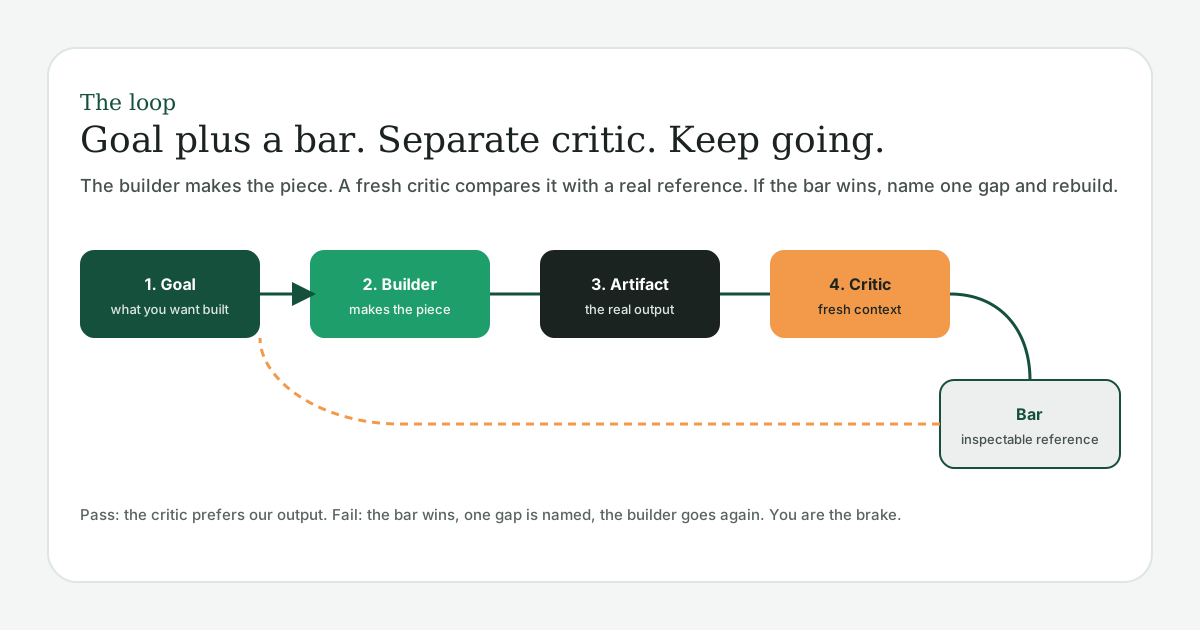
You have asked an agent to “make it great” and watched it stop at pretty good. The run looked busy. The artifact did not beat anything you could point at. A Gauntlet Loop is the fix: give the agent a real reference it can inspect, split the work into pieces a critic can judge, and never let the builder mark its own homework.
This guide packages that method as a skill you can install and run on a small, real task. You will not build a game. You will pick one homepage hero, one landing section, or one article opening, write a bar a critic can check by looking, and loop until the critic prefers your piece or you stop the run.
What a Gauntlet Loop actually is
Matt Shumer named the method after a Claude Code run that built a Three.js first-person shooter from a short prompt. The agent ran for many hours, wrote roughly 55,000 lines of code, generated the assets in code, and kept comparing the result with real Call of Duty footage. The clip of that run reached 3.8 million views. People copied the prompt. The copies worked when they kept the bar and the separate critic, not when they only copied the vibe.
The method is not a long prompt. It is a system around the model:
- A goal, not an architecture. Tell it what to produce. Let it choose how.
- A bar it can inspect. Screenshots, a live page, a test suite, a paragraph of writing you actually admire. Not the word “premium.”
- Work split into the smallest pieces that can be improved and judged on their own.
- A builder and a critic with separate context. The critic sees the artifact and the bar, not the builder’s excuses.
- No fixed round count. The exit is winning the comparison, or you stopping the run.
You need an agentic harness for this: Claude Code or Codex, with permission to open files, render output, take screenshots, and spawn subagents. Pasting the same text into a chat window will not produce the same result, because the critic has nothing real to look at.
Write a bar a critic can check
A vague bar is the usual reason this fails. “Feels premium,” “clean and modern,” and “strong visual hierarchy” give the critic nothing to fail. The critic then invents a comparison and passes the work. Write mechanisms. Every line in bar.md must be something a second agent can confirm by looking at the rendered output next to the reference.
- Useless: “Good use of whitespace.” Checkable: “Whitespace above the fold is at least 40% of the frame.”
- Useless: “Clear headline.” Checkable: “Headline is about 5× body size, and the page uses three type sizes total.”
- Useless: “On brand.” Checkable: “One accent colour, used at most twice in the first screen.”
Open the reference now, before you write a skill. Screenshot it or save the file. If you cannot fetch it, you do not have a bar. For a marketing page, pick one live page in the category you actually respect. For copy, pick three paragraphs whose clarity you want, not a famous voice you plan to imitate. For backend work, pick a test, a latency number, or a reference implementation.
# bar.md: mechanisms, not adjectives

- Headline is roughly 5× body size; three type sizes on the first screen
- One accent colour, used at most twice above the fold
- Primary action is the only filled button in view
- Hero image occupies at least 40% of the frame and is not a stock gradient
- No animation shorter than 400ms
- Body copy has a concrete noun in the first sentence
Package the loop as a skill
A skill is a folder with a SKILL.md file. The description line is the trigger: it tells Claude when to reach for this instead of improvising. Put this in your project at .claude/skills/gauntlet-loop/SKILL.md so it stays with the work. User-level skills live under ~/.claude/skills/ and fire in every project, which is the wrong default for an expensive loop.
The skill below encodes Matt Shumer’s mechanics and adds two gates that stop the most common failure. The interview forces a specific bar. The preflight confirms the critic can actually see. Neither gate tells the agent how to build the artifact. That part stays with the model.
---
name: gauntlet-loop
description: Use when the user wants a high-investment artifact judged against a real, inspectable reference. Runs a builder and a separate critic until the critic prefers our output or the user stops the run.
---

# Gauntlet Loop

Four phases: interview, preflight, bar, loop. Do not start building during the first three.

## Interview
Ask these together, then wait:
1. What are you building, and how large is the run?
2. Name a real reference the critic can open. If skip, propose three and wait.
3. Any files to work from (brand doc, draft, design system)?

## Preflight
Fetch the bar. Confirm you can render our output. Confirm input files exist. Report what is missing and which critic goes blind.

## Bar
Write 5 to 7 checkable mechanisms to bar.md. Show it before looping.

## Loop
Split into three or four independently judgeable pieces. For each piece: one builder, then a critic with fresh context, the bar, and the rendered output. Binary verdict. If the bar wins, return the single biggest gap. No fixed round count. Keep a live progress.md. The user is the brake.Run a practice loop on one piece
Do not start with a nineteen-hour hero asset. Start with one piece that can be judged on its own: the hero of a landing page, the opening of an article, the first screen of a dashboard. Tell the agent the goal and the bar. Do not prescribe the layout. Ask it to split only if the piece still has independent parts. One piece is enough for a first run.
While it runs, it should keep a progress file: piece name, round count, each critic verdict, and the named gap. Matt Shumer’s write-up asks for a live HTML page you can open from your phone. A Markdown file in the repo is enough for a practice run. Either way, you watch without interrupting every twenty minutes.
How to verify a round, and when to stop
A round is not “the model said it looks better.” A round is verified when all of these are true:
- bar.md exists and every line is checkable without adjectives.
- The critic received the rendered output (screenshot, running page, test result), not a summary written by the builder.
- The critic’s verdict is binary: ours wins, or the bar wins.
- If the bar wins, the critic named one gap, not a list of vibes.
- progress.md (or the live page) recorded the round.
You stop the run. The method has no final round. Matt Shumer stopped Claude of Duty while it was still improving. A hard bar is a direction, not a promise that you will outrun the reference. Stop when the gap is too small to matter, when the next piece would multiply cost without changing the outcome, or when you like the result. Write that rule into the first interview answer so the agent treats your ceiling as a checkpoint, not a dare.
Where this workflow fails
- No real bar. The critic grades against a mood. Everything passes on round one.
- The builder grades itself. Same context, same excuses, scores drift up.
- The critic reads the code instead of the rendered result. It evaluates intent.
- You prescribed the architecture. The model spends the run obeying your plan instead of attacking the bar.
- Too many pieces. Each extra piece multiplies builders, critics, and cost.
- You ran it in a chat window. There is no screenshot, no subagent, no loop.
Skip this method for cheap tasks. A skill that formats a commit message does not need a gauntlet. Use it when the artifact is the thing people will judge, and when you can name a reference that already does that job well. Landing pages, product films, documentation homes, and flagship demos are the right shape. A Tuesday bugfix is not.
Source of the Gauntlet Loop
This method is an adaptation of the Gauntlet Loop, invented by Matt Shumer. He named it, defined it, and built the original: a Three.js FPS from a single prompt that did 3.8 million views. Everything on this page is a variation on his idea.
Matt Shumer introduces the Gauntlet Loop:
- His founding post, “I’m officially calling this the Gauntlet Loop”: https://www.linkedin.com/posts/mattshumer_3-days-ago-i-posted-a-game-claude-opus-5-activity-7487633416948117506-LfTo
- How to run one, and why it works for more than games: https://somethingbig.ai/gauntlet-loop
- The original prompt, verbatim (GitHub): https://github.com/mshumer/Claude-of-Duty/blob/main/prompt.md
- The method write-up: https://somethingbig.ai/gauntlet-loop
Get new guides in your inbox
One task, one guide, done fast. Practical Claude Code skills, zero noise.