Install HyperFrames Without Mixing Routes: One Method per Agent, Then Gate the Render
Someone pastes one HyperFrames install line into Claude Code, Codex, and Grok Build. Then the skill never loads in one of them, or a render bills HeyGen credits nobody expected. Same name, three different tools. That is the whole problem.
This is the field card. One install route per agent, a check that the route worked, and a gate before every render. We ran every command below on Windows 11 with hyperframes 0.8.135 on October 5, 2026. Where a step comes from a field report instead of HeyGen docs, we say so.
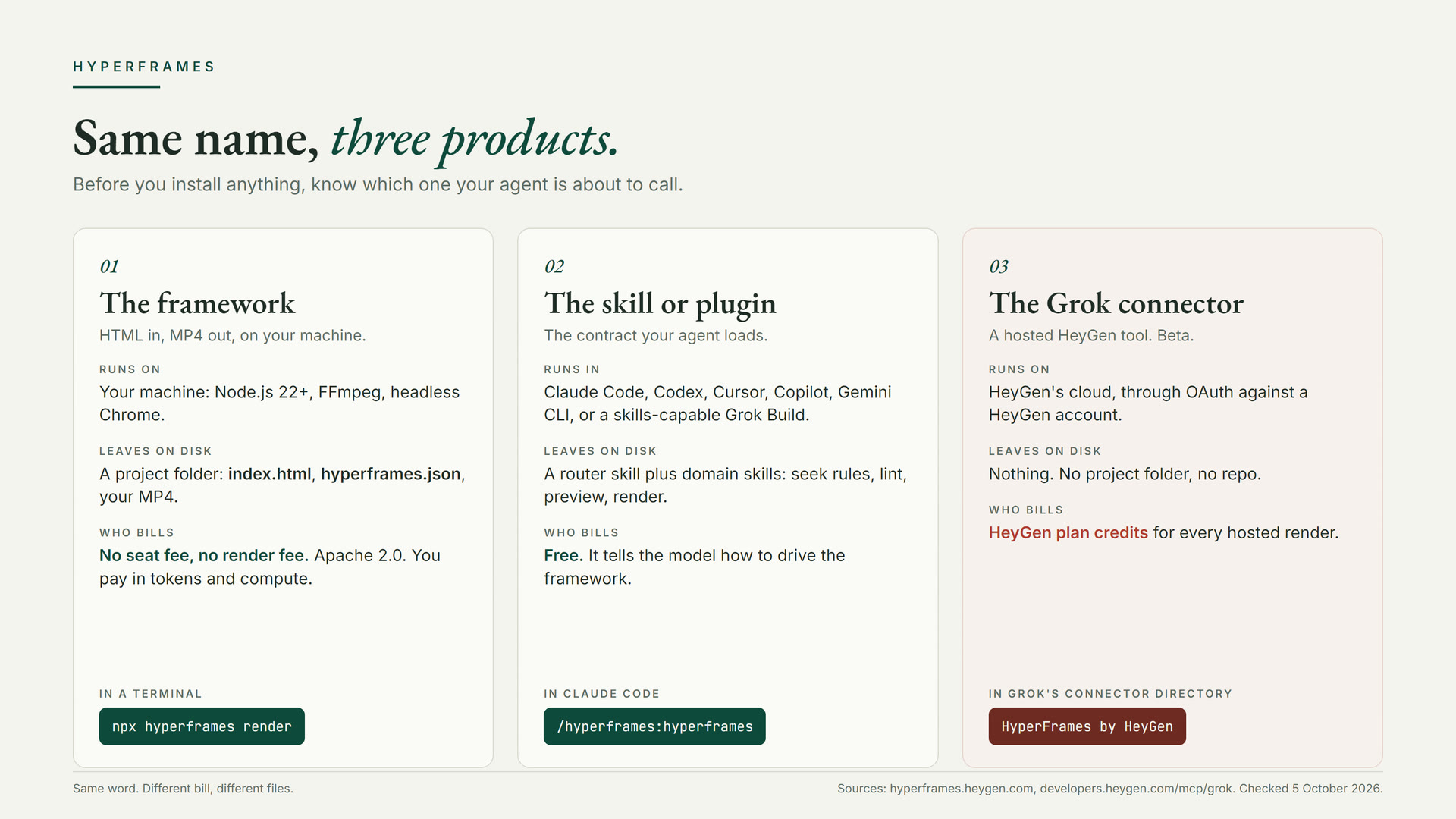
What you are installing
HyperFrames is HeyGen's open-source framework for turning HTML, CSS, media, and a seekable animation timeline into an MP4. It is Apache 2.0. A local render has no seat fee and no per-render fee. You pay in tokens and compute.
The framework is not what your agent loads. Your agent loads a skill: a router plus domain skills that teach the composition contract. Timed elements carry class="clip" and data-start, data-duration, and data-track-index attributes. The page registers a paused timeline on window.__timelines under the same id as data-composition-id. The renderer never presses play. It seeks the timeline one frame at a time in headless Chrome, and FFmpeg encodes the frames.
Generic "make a video with HTML" memory does not include that contract. Without the skill you can get a pretty web page that animates in a browser and still cannot be rendered. That is why the install route matters more than the install command.
Step 0: preconditions
You need Node.js 22 or newer, npm, and FFmpeg for a local render. Docker is optional; the CLI uses it for a pinned, deterministic render. The doctor command tells you what is missing before a render fails halfway.
A plugin does not synchronize machines. If you work on a laptop and a desktop, install on both.
Step 1: pick one route
HeyGen documents two install routes. The plugin route is for agents that have a named HyperFrames plugin. The skills route is for everything else. Pick one per agent. Never run both on the same agent.
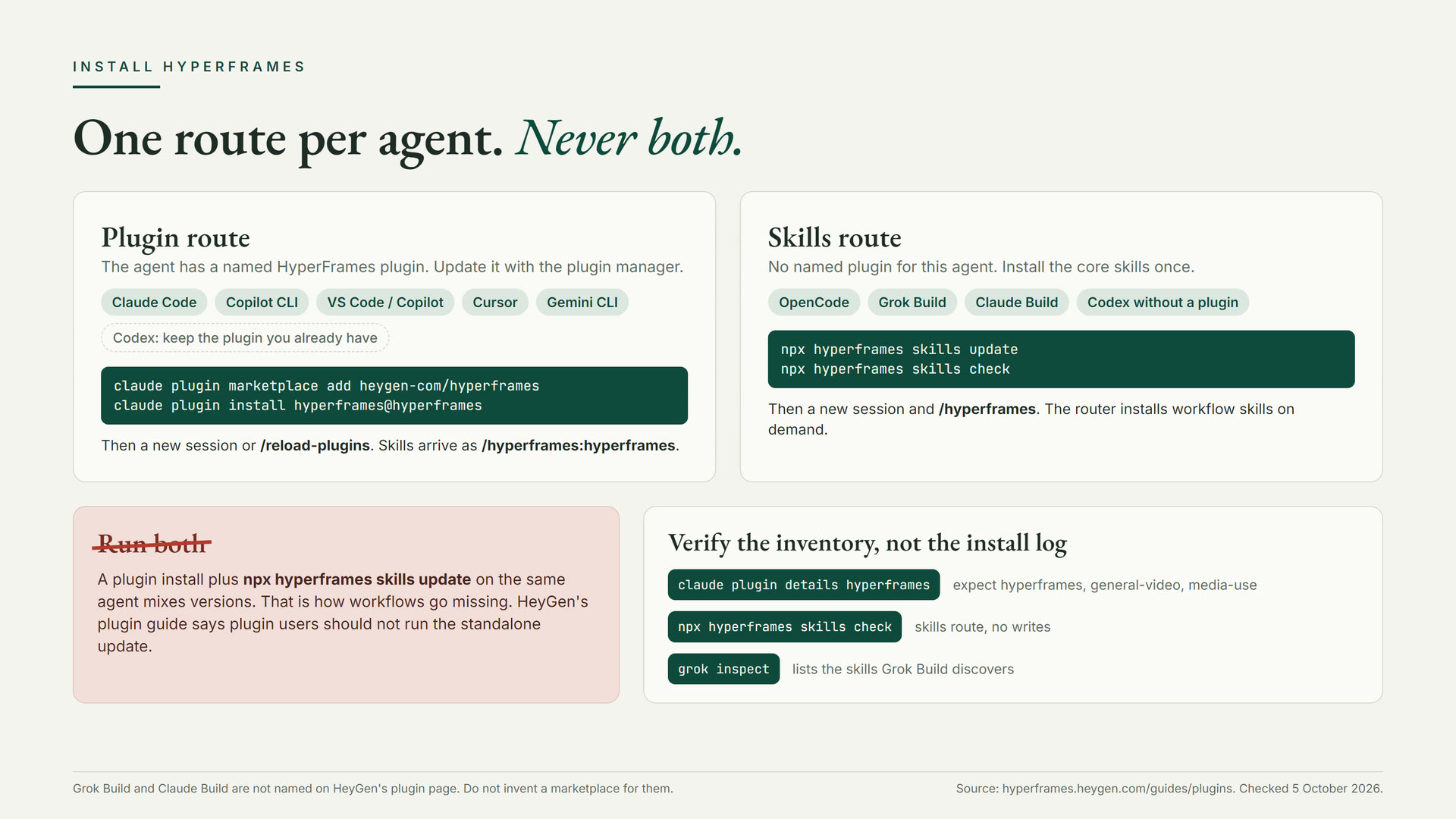
- Claude Code: plugin route. This is the recommended path.
- Copilot CLI, VS Code with Copilot, Gemini CLI: plugin route, with their own named installs on the HeyGen plugin guide.
- Cursor: a team marketplace import or a local plugin folder. HeyGen notes that the repository manifests are not proof of a public Cursor marketplace listing.
- Codex: if a HyperFrames plugin is already installed, stay on it. HeyGen says directory updates are published separately. If none is installed, use the skills route.
- OpenCode: skills route.
- Grok Build and Claude Build: not named on the HeyGen plugin guide. Use the skills route. Do not invent a marketplace for them.
Step 2a: the Claude Code plugin route
Verify the inventory, not the install log. If details does not list all three, the install did not finish, and no prompt will fix that.
- Auto-update: run /plugin, open Marketplaces, select hyperframes, and choose Enable auto-update. Third-party marketplaces do not enable it by default.
- Manual update: claude plugin update hyperframes@hyperframes, then reload plugins.
- Older installs: a core-skills@hyperframes plugin can be removed with claude plugin uninstall core-skills@hyperframes, but only after the new inventory checks out.
- Cleanup: do not delete a whole .claude or .agents directory to start fresh. List what is there first. Other skills live there too.
- Some directories list a different marketplace name for this plugin. The HeyGen README and plugin guide use hyperframes@hyperframes from heygen-com/hyperframes. Prefer that, and never install both.
Step 2b: the skills route
For OpenCode, Grok Build, Claude Build, and Codex without a plugin, install the core skills once. The update command installs or refreshes the core set and links it into compatible installed agents. It does not add every optional workflow; the router pulls a workflow when a request needs one.
There is an interactive alternative for a human at the keyboard: npx skills add heygen-com/hyperframes. The picker opens with nothing selected. Choose Core Skills. Do not default to the full set. The README warns that a non-interactive or agent run of skills add without a --skill flag installs all 21 published skills. It also notes that skills add resolves the skills.sh registry copy, which can lag the main branch by hours, while skills update installs from current main.
Grok Build: start a new session after the install and invoke /hyperframes. A Grok Build skills note from October 1, 2026 says Grok discovers skills in .grok/skills, ~/.grok/skills, plugin folders, and Claude-compatible locations including ~/.agents/skills. We checked the behavior locally: grok inspect on Grok Build 1.0.46 printed a Skills section that included skills from Claude-compatible paths, tagged [claude]. Read that as "Grok Build can see a normal skills install," not as "HeyGen ships a Grok plugin."
Not this, unless you mean credits
Grok's connector directory lists HyperFrames by HeyGen (search for hyp). That is a hosted HeyGen tool. It authenticates with OAuth against a HeyGen account, renders in HeyGen's cloud, draws HeyGen plan credits, and leaves no project folder on your machine. HeyGen calls the hosted path beta and recommends a Creator plan or above. None of that is the local skill this card installs.
Step 3: the first prompt
Invoke the skill by name. A bare "make a video" is weaker than Using /hyperframes, because the explicit invocation loads the routing and composition context. In Claude Code's plugin, the name is /hyperframes:hyperframes. Keep the first job tiny: a title card, not a launch video.
- BRIEF.md holds the settled answers. To change an answer, edit the file instead of re-explaining yourself. A later session, or a different agent, resumes from it.
- Leave npx hyperframes preview open. HeyGen's prompting guide calls prompting without the preview open a blind guess.
- Give small notes: one scene, one timing change, or one style ban per turn.
- The docs include a skip-interview prompt, "Just build it, don't ask me anything." It locks automation and skips the storyboard. Use it as a choice, not a default.
A warm start beats a cold one. Hand the agent a URL, a PR, a CSV, or reference frames. In one Reddit thread about a HyperFrames wrapper, a commenter said one model invented a UI that did not match the real app. Pointing the workflow at the real product is the fix, and that is what /product-launch-video is for.
Step 4: gate the render
HeyGen's guide is plain about it: npx hyperframes lint and npx hyperframes check, and both must pass before you render. lint reads the contract statically. check runs the composition in a headless browser and covers structure, runtime errors, layout collisions, motion, and WCAG AA contrast.
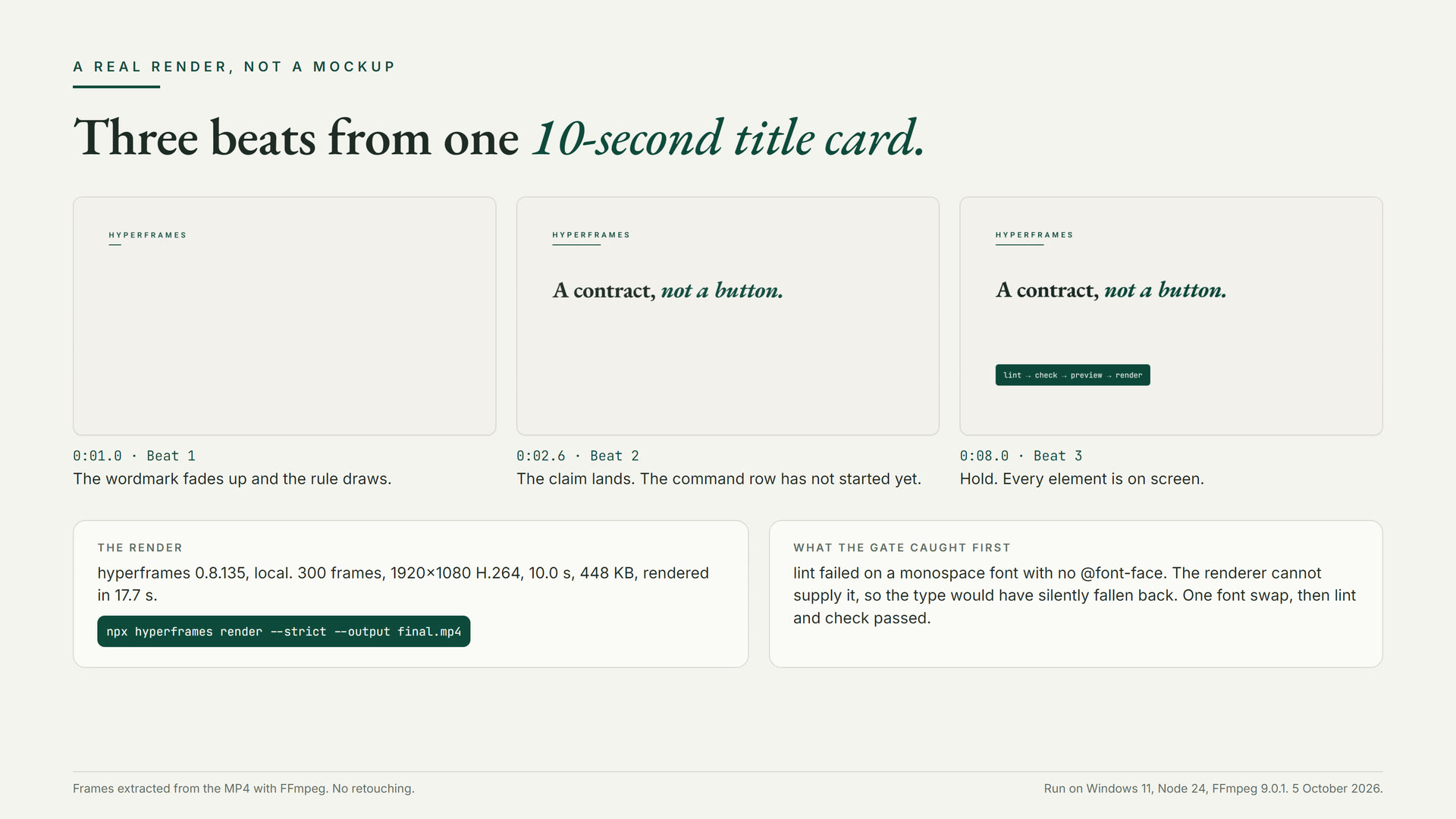
Here is what the gate did on our title card. The first lint failed: we had named a monospace font that had no @font-face rule, and the renderer could not supply it. Lint exited 1. check refused to run the browser pass and said so: its layout, motion, and contrast results were empty placeholders, not a clean pass. We swapped the font stack, and both passed.
Two things surprised us. The compiler fetched Google Fonts and injected @font-face rules for the families we named, so our Georgia stack rendered as EB Garamond. Name the face you actually want. And --strict is worth the keystrokes: it fails the render on lint errors instead of shipping a broken MP4.
Five failures we would check first
- Mixed install. A plugin plus a standalone skills update on the same agent. Symptom: workflows the router names are missing or stale. Fix: pick the route, remove the other, verify the inventory.
- Install that hangs. Usually the skills add path pulling large files. Try skills update first; the LFS skip above is a community workaround.
- A video element animated directly. HeyGen's symptom is "a video freezes while its box animates." Animating width, height, top, or left on the video element breaks frame updates. Wrap the video in a div and animate the wrapper. Also never call play(), pause(), or set currentTime from composition scripts. HyperFrames owns media playback.
- Skipped check. Lint passing is not the gate. check is the step that runs the page in a browser and finds collisions and contrast failures.
- Remote media in the render. Expiring URLs, permissions, and cross-origin rules break renders that previewed fine. Prefer a local project asset, and resize oversized media.
Effort and cost
On the local path, tokens are the bill. A title card is cheap next to a multi-scene launch with voiceover and a storyboard. A skill author on r/ClaudeCode warned in June 2026 that one HyperFrames launch video does a lot of planning. Watch the session cost. A practical split: high effort for the storyboard pass, medium for scene tweaks.
Treat a one-shot as a first cut. A Claude Code user reported in September 2026 that Opus 5.5 one-shot a tutorial video in under 30 minutes, with rough edges left in on purpose. That is a fast draft. The gate still applies.
Before you run it, read it
A video skill is still a skill. It can run commands, fetch fonts, and write files. HyperFrames has tens of thousands of GitHub stars, and star counts measure attention, not correctness. Give it the same five-minute read you give any skill before you trust it, then let the gate do its job.
Companion articles: the DevOps version on ClaudeSkillsGitHub covers pinning the CLI, gating renders in CI, and reviewing an agent-made composition in a pull request. The architecture version on ClaudeSkillsGuide covers the three bills, the Opus 5.5 benchmark and its dissent, and a decision record. Both are linked under Sources.
Never miss a post
Updates on format changes, community features, and skill building.