Drive EffectCraft with Claude: MCP, Save, and Verify
EffectCraft lets Claude Code create and edit motion graphics through the Model Context Protocol, or MCP: a standard way for an AI client to call tools. Start with a short title card, save the editable project, and inspect the output. The documented interface is promising for experiments; EffectCraft is still alpha and is not a replacement for an existing After Effects client workflow.
This walkthrough is based on EffectCraft v0.11.1 documentation and the October 18 release, rechecked October 19, 2026. The title-card experiment has not been executed for this article. Commands and the interactive mockup are documentation examples, not a recorded session or a render benchmark.
1. Install the app and locate the CLI
Choose an asset for your operating system from the v0.11.1 release. Compare its SHA-256 with SHA256SUMS.txt from that same release before running it. Keep the release version with your project notes so an update does not silently change the workflow.
- Windows: the MSI installs the desktop app and CLI, but the CLI is not automatically on PATH. Locate it in the installation you chose and add that directory to PATH before using the short commands below.
- Linux: the deb and rpm packages place the CLI on PATH. For other package formats, locate the executable and follow that package’s instructions.
- macOS: obtain the separate effectcraft-cli ZIP as well as the desktop app. Installing the app alone does not make the CLI available.
If building from source, the v0.11.1 Cargo manifest requires Rust 1.95 or newer. Build the CLI once before registering a cargo-based MCP server; compiling during MCP startup can cause a connection timeout. For a first experiment, a verified release binary avoids that extra setup.
2. Register a project-scoped MCP server
Confirm that Claude Code and effectcraft-cli are available in your terminal. From your experiment project, register the stdio server with autosave. Stdio means Claude starts the process and communicates through its input and output streams. The project scope keeps this connection specific to that project.
For a manual configuration, merge this entry into the project’s .mcp.json. Preserve any other servers. Do not replace the entire file. Claude Code documents the registration and trust flow in its MCP guide.
{
  "mcpServers": {
    "effectcraft": {
      "type": "stdio",
      "command": "effectcraft-cli",
      "args": [
        "mcp",
        "--autosave"
      ]
    }
  }
}
The default server is headless: it does not open a desktop window. Autosave writes checkpoints after edits, but still ask the agent to save a named .ecproj file at each milestone. A checkpoint protects recovery; a named project is the handoff you can reopen and edit.
3. Give Claude a small, verifiable task
Ask for one composition with one animated title before adding footage, tracking or multiple scenes. Specify dimensions, duration, frame rate, save target and the review condition. These constraints make a failed step easier to identify.
Use the EffectCraft MCP server for a small title-card experiment.
First inspect the available tools and describe the commands you need.
Create Main: 1920x1080, 5 seconds, 24 fps.
Add a solid background and a text layer: Hello EffectCraft.
Animate the text position from [960,1080] at 0s to [960,540] at 2s.
Use composition time explicitly for keyframes and Easy Ease interpolation.
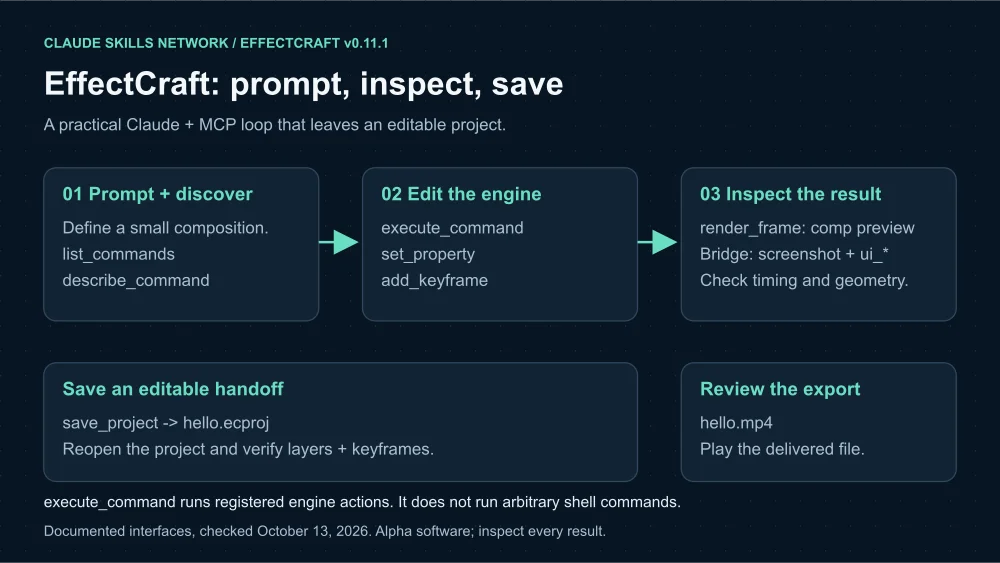
Render preview frames at 0s, 1s and 2s for visual review.
Save the editable project as hello.ecproj before exporting hello.mp4.
Report the saved project, rendered output, and any warnings.
Do not declare success until the project reopens and the export is reviewed.
Have the agent discover command IDs with list_commands and inspect parameters with describe_command. execute_command then runs an EffectCraft engine action. Do not ask it to guess a command schema from an After Effects tutorial or to treat this tool as a general shell.
4. Keep keyframe time explicit
A layer can start late or run at a different speed from its composition. Those two clocks no longer agree. EffectCraft’s documentation says set_property and add_keyframe use layer time by default, while frame previews use composition time. Pass timeBase: "comp" when supplying composition timestamps.
{
  "layer": 2,
  "path": "transform/position",
  "keys": [
    {
      "time": 0,
      "value": [
        960,
        1080
      ]
    },
    {
      "time": 2,
      "value": [
        960,
        540
      ]
    }
  ],
  "timeBase": "comp",
  "interpolation": "easyEase"
}
This is an example add_keyframe payload. Replace layer 2 with the layer ID returned by your actual create command. Review the parameter schema in your installed version before executing it. The exact API contracts are in the agent documentation.
5. Review, save and reopen
- Inspect rendered frames at the start, midpoint and end of the movement. Check text placement, clipping, timing and the intended background.
- Call save_project with the chosen .ecproj filename. Confirm that the save succeeds and preserve any warnings.
- Open that project in EffectCraft and check the layer names and keyframes. A preview image alone does not demonstrate that the editable project survived.
- Export the clip and play it. Check dimensions, duration, motion and any audio. A completed tool call is only one part of the completion condition.
To troubleshoot a failed MCP connection, first check whether the CLI is discoverable from the environment launching Claude Code. If startup invokes cargo, prebuild the CLI. If a saved project is missing, read autosave warnings and recover deliberately; do not open a new project over unsaved work. If keyframes land at the wrong time, inspect layer offsets and timeBase before changing the prompt.
When a live desktop window helps
Use bridge mode when you want the agent and the human to see the same running app. Start the desktop app with a control port, then register a separately named server using --bridge. Bridge mode adds screenshot and UI inspection tools. The desktop app owns its autosave in this mode; --autosave is for the headless server.
Knowledge path: build a repeatable creative skill
Once the small experiment works on your machine, put the procedure into a skill: check the version, discover command schemas, create the composition, inspect frames, save the project and verify the export. Keep these decisions in instructions and use MCP for tool access. EffectCraft is an application and tool server, not itself a SKILL.md package.
Review the repository and installation details in Verify and Run EffectCraft. For the architectural implications and adoption boundaries, read EffectCraft Is an Agent-Native Compositor.
Never miss a post
Updates on format changes, community features, and skill building.