Choosing Your AI IDE: How VS Code, Cursor, and Antigravity Change How You Build Skills
When you author a Claude skill or structure an agent workflow, you are not writing prose in a vacuum. You are authoring instructions for an execution environment. The editor you choose as your daily driver directly controls the context window, file-access permissions, terminal interaction, and multi-agent dispatch mechanisms your skills depend on.
Today, three primary platforms define AI-assisted engineering: Visual Studio Code, Cursor, and Google Antigravity. Each embodies a fundamentally different philosophy of AI collaboration, and each imposes distinct constraints on how skills load, run, and verify.
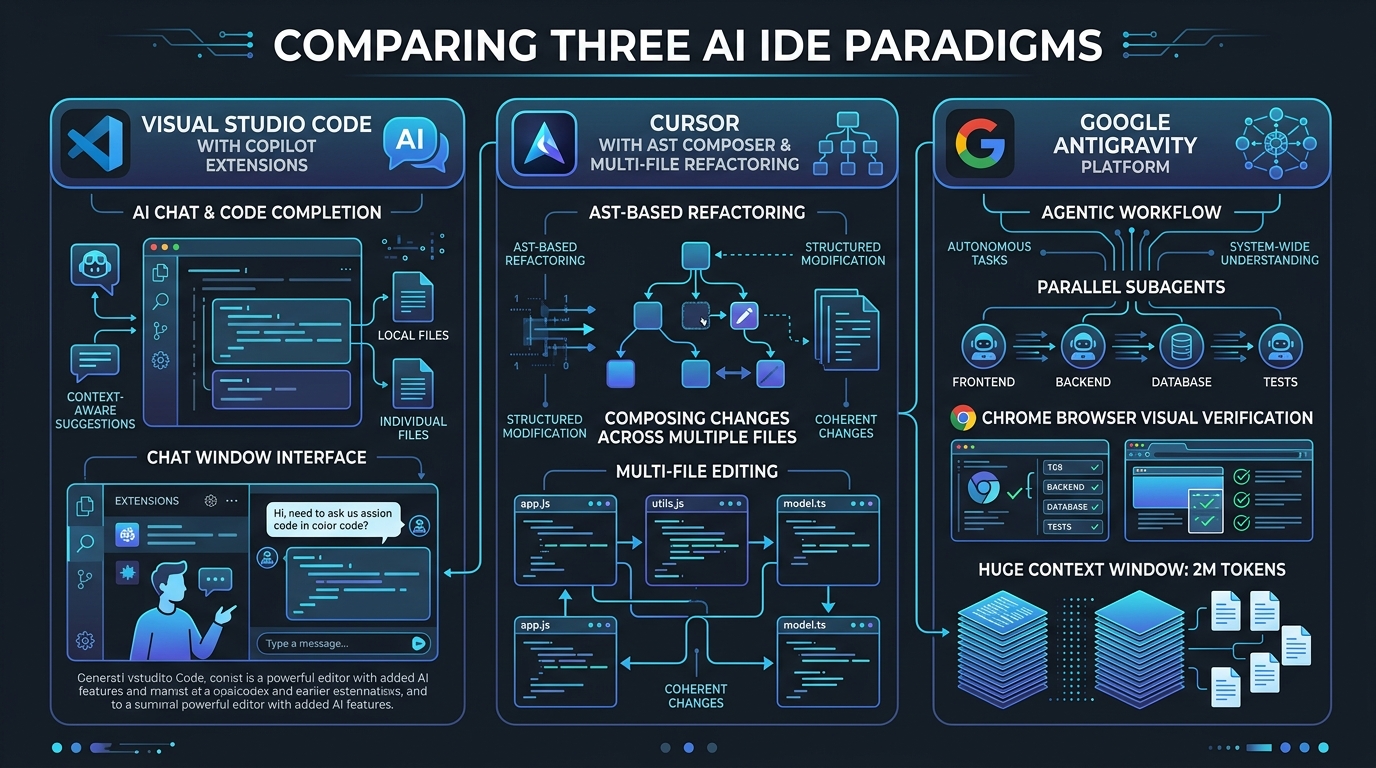
1. Visual Studio Code: Human-Centric Editing with Modular Tooling
VS Code remains the industry foundation. Its core architecture is deliberately decoupled from any single AI vendor: the editor provides a lightweight text editing core, and AI capabilities enter through modular extensions such as GitHub Copilot, Continue.dev, or terminal-based agent runtimes like Claude Code and Codex.
- Deterministic local environment: Full access to the official Microsoft Marketplace, including proprietary extensions like Pylance, Remote-SSH, C# Dev Kit, and Live Share.
- Zero background indexing bloat: Monorepos with millions of lines stay stable without unexpected background CPU indexing or memory consumption.
- Strict isolation for skill testing: Terminal-based agent sessions run under explicit permission gates, allowing authors to test SKILL.md files against clean directory states without hidden prompt injection from editor buffers.
- Lowest total cost of ownership: Core IDE is free, with GitHub Copilot priced at $10 to $19 per user per month.
The constraint for skill builders: Because AI lives inside separate extensions or terminal panes, context selection relies on open tabs or explicit file references rather than automatic semantic codebase indexing. Complex multi-file refactoring requires sequential step-by-step review across individual files rather than unified, atomic diffs.
2. Cursor: Editor-Centric Pairing with AST Buffer Integration
Cursor forks VS Code to rewire editor internals around neural models. Rather than treating AI as an external plugin, Cursor weaves model intelligence into the text buffer, the file tree, and the terminal.
- Sub-200ms predictive editing: Cursor Tab anticipates multi-line completions, import statements, and cursor jumps before you type them.
- Unified multi-file edits: Composer allows builders to prompt edits across 10 to 15 files at once, displaying a single combined diff for immediate review.
- Semantic codebase indexing: Client-side Merkle trees and Tree-Sitter AST chunks map project dependencies into cloud vector stores, allowing agents to understand broad codebase relationships.
- Background cloud agents: Dedicated off-machine agents can consume GitHub issues, run tests in isolated containers, and prepare draft pull requests asynchronously.
The trade-off for skill authors: Cursor uses the Open VSX Registry, meaning Microsoft proprietary extensions like Pylance and Live Share are unavailable. Furthermore, heavy use of frontier models like Claude 3.7 Sonnet or Opus quickly burns through usage pools, making token management an operational constraint.
3. Google Antigravity: Agent-First Workforce Orchestration
Google Antigravity represents a paradigm shift from typing code to orchestrating digital engineering teams. It splits the development workspace into a Manager View (Mission Control) and an Editor View with command-line surfaces.
- Parallel subagent dispatch: The Manager View allows developers to spawn up to 5 parallel agents working concurrently across isolated workspaces or git worktrees.
- Built-in Chrome browser verification: Agents can open a real local Chrome instance, click buttons, fill forms, execute DOM assertions, and record screenshots and video as proof of work.
- 2 Million token context window: Powered natively by Gemini 3.1 Pro, agents can ingest entire medium-sized codebases without losing context or forgetting instructions.
- Structured Markdown deliverables: Rather than dumping chaotic terminal output, Antigravity generates clean Markdown artifacts: implementation plans, task checklists, diffs, and walkthroughs.
- Generous preview access: Free preview tiers grant access to Gemini Pro, Claude Sonnet, and open models.
The trade-off: The dual-surface interface introduces workflow friction for developers who prefer single-window code editors, and all model reasoning runs on Google Cloud servers, making it unsuitable for strictly air-gapped security requirements.
Featured Knowledge Path: The Skill Builder and Agent Extensibility Path
If you are building reusable skills and autonomous procedures, your learning roadmap should follow this three-stage progression:
- Stage 1: Portable Prompt and Trigger Foundations. Author self-contained SKILL.md packages with sharp "Use when..." descriptions, verified boundary conditions, and progressive disclosure references. Test them first inside VS Code using terminal-based Claude Code to ensure instructions trigger reliably without editor bias.
- Stage 2: Buffer-Integrated Multi-File Iteration. Migrate into fast multi-file environments like Cursor Composer. Learn how to craft project rule files (.cursor/rules and CLAUDE.md) that prevent models from exceeding token limits during massive 15-file refactoring runs.
- Stage 3: Autonomous Subagent and UI Verification Loops. Scale your capabilities to multi-agent platforms like Google Antigravity. Build skills that coordinate parallel worktrees, launch headless browser smoke tests, and summarize complex executions into structured Markdown artifacts.
Cross-Site Perspectives
For an evaluation tailored to open-source repository maintenance, git worktree hygiene, and background PR agent security, read our companion piece on Claude Skills Hub: [Choosing an AI IDE for GitHub Repositories](https://claudeskillsgithub.com/blog/choosing-an-ai-ide-github-devops-cursor-antigravity-vscode).
For an architectural decision matrix covering total cost of ownership, token economics, and enterprise standardization, read the guide on ClaudeSkillsGuide: [AI IDE Architectural Comparison for Engineering Leaders](https://claudeskillsguide.com/blog/ai-ide-architectural-comparison-vscode-cursor-antigravity).
Never miss a post
Updates on format changes, community features, and skill building.